What Is Tws Earbuds? A Comprehensive Guide
Ever wondered what those sleek, wire-free earbuds everyone’s sporting are all about? You’re likely seeing and hearing about ‘TWS earbuds’ everywhere. But what exactly are they? This article is your ultimate guide, breaking down everything you need to know about these popular audio companions. We’ll explore their features, advantages, and even some things to consider before you take the plunge.
From the commute to your workout, TWS earbuds have become a staple for many. They promise freedom from tangled wires and a seamless listening experience. But with so many options available, understanding the technology and knowing what to look for can feel overwhelming. Don’t worry, we’ll cover the basics, the nuances, and help you decide if TWS earbuds are the right fit for your lifestyle.
So, let’s get started. Prepare to become an expert on all things TWS!
What Does Tws Stand for?
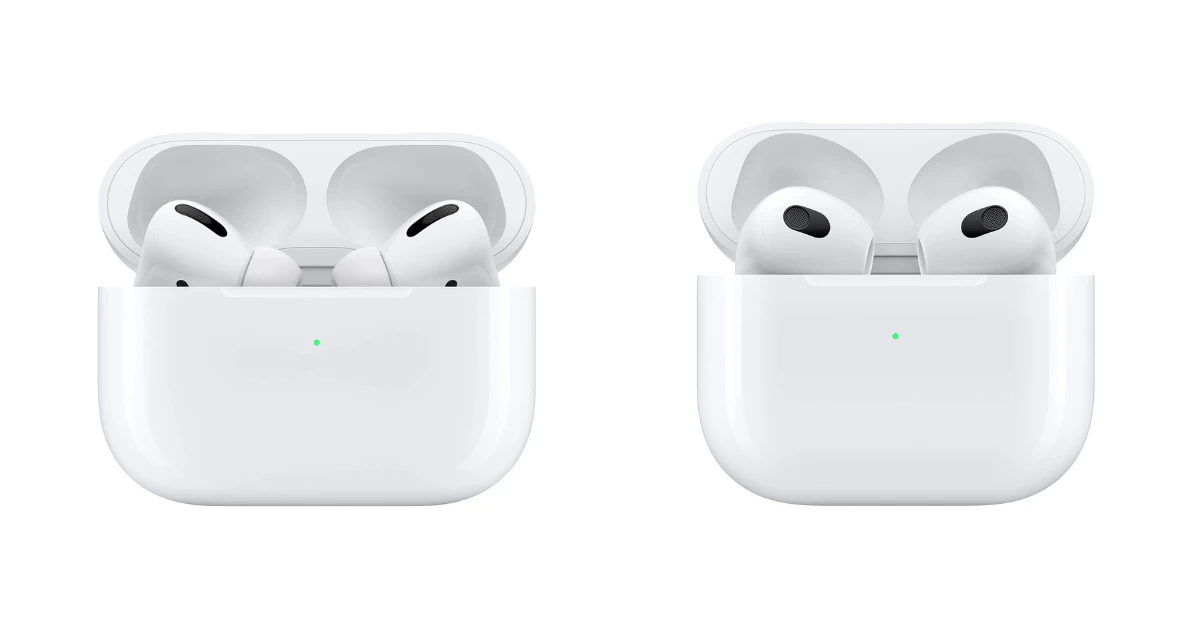
Let’s start with the basics. TWS stands for True Wireless Stereo. This means each earbud operates independently, without any wires connecting them to each other or to your device. This is the key difference from older Bluetooth earbuds, which often had a wire connecting the two earpieces.
The ‘stereo’ part refers to the fact that each earbud can deliver a separate audio channel (left and right), providing a stereo sound experience. This enhances the immersion of your music, podcasts, or calls.
How Tws Earbuds Work: The Technology Behind the Magic
TWS earbuds are packed with technology. Here’s a breakdown of the key components and how they work together:
Bluetooth Connectivity
Bluetooth is the foundation. Each earbud connects wirelessly to your smartphone, tablet, or other Bluetooth-enabled devices. The latest Bluetooth versions (e.g., Bluetooth 5.0, 5.2, or newer) offer improved range, faster pairing, and better power efficiency. Bluetooth transmits audio data from your device to the earbuds.
The Chipset
Inside each earbud, there’s a chipset (the brains). This chipset handles various functions, including:
- Bluetooth communication: Managing the connection with your device.
- Audio processing: Decoding and converting the digital audio signal into an analog signal that can be played through the speaker.
- Power management: Optimizing battery usage for longer listening times.
- Noise cancellation (if equipped): Processing the incoming sound and creating an opposing sound wave to cancel out external noise.
The Driver
The driver is the speaker component, responsible for converting electrical signals into sound waves. The size and quality of the driver significantly impact the sound quality of the earbuds. Different driver types exist, including dynamic drivers (common and versatile), balanced armature drivers (often used for clarity), and planar magnetic drivers (known for their precision).
The Battery
TWS earbuds rely on rechargeable batteries. The size of the battery determines how long you can listen on a single charge. The charging case also has a battery to provide additional charging cycles for the earbuds. Battery life is a critical consideration when choosing TWS earbuds, as it directly impacts your user experience.
The Charging Case
The charging case is an essential part of the TWS experience. It serves two primary functions:
- Charging: When you place the earbuds in the case, they recharge. The case itself also needs to be charged, typically via a USB-C cable.
- Storage: The case provides a safe and convenient place to store your earbuds when not in use.
Microphones
Most TWS earbuds include microphones for making phone calls and using voice assistants. The quality of the microphone impacts the clarity of your voice during calls. Some earbuds have multiple microphones and use noise-canceling technology to improve call quality in noisy environments.
Key Features and Considerations When Choosing Tws Earbuds
When shopping for TWS earbuds, several features and factors can influence your decision. Here’s what to look for:
Sound Quality
Sound quality is paramount. Consider these aspects:
- Driver type and size: Larger drivers often provide a more powerful and fuller sound. Research the driver type and its characteristics.
- Frequency response: This indicates the range of frequencies the earbuds can reproduce. Look for a wide frequency response (e.g., 20Hz – 20kHz) to ensure a full audio experience.
- Audio codecs: Codecs like AAC and aptX (for Android devices) can improve audio quality over Bluetooth. Check which codecs the earbuds support.
- Overall sound signature: Some earbuds are tuned for bass-heavy sound, while others prioritize clarity and detail. Consider your listening preferences.
Battery Life
Battery life is another crucial aspect. Consider these points:
- Earbud battery life: How long the earbuds last on a single charge.
- Charging case battery life: How many additional charges the case can provide.
- Total listening time: The combined battery life of the earbuds and charging case.
- Charging time: How long it takes to fully charge the earbuds and the case.
Look for earbuds that offer at least 5-6 hours of playback time on a single charge, with the charging case providing several additional charges.
Comfort and Fit
Comfort and fit are highly personal. Consider these elements:
- Ear tip options: Earbuds usually come with different sizes of silicone ear tips to ensure a snug fit. Experiment with different sizes to find the best fit for your ears.
- Ergonomic design: Look for earbuds that are designed to fit comfortably in your ear. Some have a stem, while others are more compact.
- Weight: Lighter earbuds are generally more comfortable for extended use.
If possible, try on the earbuds before buying to ensure they fit comfortably in your ears.
Noise Cancellation
Noise cancellation (ANC) can significantly improve your listening experience, especially in noisy environments. Two primary types exist:
- Active Noise Cancellation (ANC): Uses microphones to detect external noise and then generates an opposing sound wave to cancel it out.
- Passive Noise Isolation: Relies on the physical design of the earbuds and the ear tips to block out external noise.
ANC is an excellent feature for commuters, travelers, and anyone who wants to focus on their music or calls without distractions.
Water Resistance
Water resistance is essential if you plan to use your earbuds during workouts or in wet conditions. Look for an IPX rating:
- IPX4: Splash-proof (suitable for light rain and sweat).
- IPX5: Water-resistant (can withstand jets of water).
- IPX7: Waterproof (can be submerged in water for a short time).
The higher the IPX rating, the more resistant the earbuds are to water and dust.
Controls
Controls allow you to manage your music, calls, and voice assistant directly from the earbuds. Options include:
- Touch controls: Tapping or swiping on the earbuds to control playback, volume, and calls.
- Button controls: Physical buttons on the earbuds.
- Voice control: Using your voice assistant (e.g., Siri, Google Assistant) to control the earbuds.
Consider which control method you prefer, and ensure the earbuds have the controls you need.
Bluetooth Version and Codecs
As mentioned earlier, the Bluetooth version (e.g., 5.0, 5.2, or newer) influences the range, stability, and power efficiency of the connection. Also, different audio codecs impact sound quality. Some popular codecs include:
- SBC: The basic Bluetooth codec.
- AAC: Common on iOS devices.
- aptX: Often found on Android devices, offering higher quality audio than SBC.
- LDAC: Sony’s high-resolution audio codec.
Check the Bluetooth version and supported codecs to ensure compatibility with your devices and optimal audio quality.
Microphone Quality
Microphone quality is crucial for calls. Look for earbuds with:
- Multiple microphones: For improved noise cancellation and voice clarity.
- Wind noise reduction: To minimize wind interference during calls.
- Beamforming technology: To focus on your voice and reduce background noise.
Read reviews to assess the microphone quality, especially if you plan to use the earbuds for calls frequently.
Charging Case Features
The charging case is not just for charging; it can also offer extra features:
- Wireless charging: Allows you to charge the case on a wireless charging pad.
- Fast charging: Provides a quick charge for the earbuds.
- LED indicators: To show the battery level of the earbuds and the case.
- Compact size: A smaller case is more portable.
Consider what features are important to you in a charging case.
Price
Price is a significant factor. TWS earbuds range from budget-friendly options to premium models. Set a budget and compare features and specifications to find the best value for your needs.
Different Types of Tws Earbuds
TWS earbuds come in various styles and designs, each catering to different preferences and use cases:
In-Ear Earbuds
In-ear earbuds (also known as canal-type earbuds) fit directly into the ear canal, creating a seal that helps block out external noise and improve bass response. They typically come with different sizes of silicone ear tips for a secure and comfortable fit. These are the most common type.
True Wireless Earbuds with Stems
These are a variation of in-ear earbuds that feature a stem that extends downwards from the earbud. The stem often houses the microphone and touch controls. The stem design can provide a more secure fit and easier access to controls.
Earbuds with Ear Hooks/wings
These earbuds feature ear hooks or wings that secure them to your ears, making them ideal for workouts and other activities where you need a secure fit. The hooks or wings wrap around the outer ear to prevent the earbuds from falling out.
Over-Ear (on-Ear) Earbuds
While less common, some manufacturers offer true wireless over-ear headphones. These combine the wireless freedom of TWS with the larger earcups and potentially superior sound quality of over-ear headphones. These are typically bulkier and less portable than in-ear options.
Open-Ear Earbuds
Open-ear earbuds, also known as bone conduction earbuds, sit outside the ear canal, allowing you to hear ambient sounds while listening to music. They use bone conduction technology to transmit sound vibrations through your cheekbones directly to your inner ear. These are a good choice for safety reasons as they allow you to hear your surroundings.
How to Choose the Right Tws Earbuds for You
Choosing the perfect TWS earbuds involves considering your needs and priorities. Here’s a step-by-step guide:
1. Identify Your Needs
Consider your primary use cases:
- Commuting: Noise cancellation and long battery life are important.
- Working out: Water resistance and a secure fit are essential.
- Making calls: Good microphone quality is a priority.
- Casual listening: Sound quality and comfort are key.
2. Set a Budget
Determine how much you’re willing to spend. TWS earbuds range in price, so setting a budget will help narrow your options.
3. Research Brands and Models
Research different brands and models. Read reviews from reputable sources to get an idea of the sound quality, features, and overall performance.
Here’s a sample comparison table:
| Feature | Earbud A | Earbud B | Earbud C |
|---|---|---|---|
| Price | $100 | $150 | $200 |
| Noise Cancellation | Yes | Yes, Adaptive | Yes, Excellent |
| Battery Life (Earbuds) | 6 hours | 7 hours | 8 hours |
| Water Resistance | IPX4 | IPX5 | IPX7 |
| Bluetooth Version | 5.0 | 5.2 | 5.3 |
| Audio Codec | AAC, SBC | AAC, aptX | AAC, aptX, LDAC |
| Microphone Quality | Good | Very Good | Excellent |
| Wireless Charging | No | Yes | Yes |
This table offers a sample comparison. Actual specifications will vary. Use these examples to compare the features that are most important for your requirements.
4. Prioritize Features
Decide which features are most important to you:
- Sound quality
- Battery life
- Noise cancellation
- Comfort and fit
- Water resistance
- Microphone quality
5. Read Reviews
Read reviews from multiple sources. Pay attention to the experiences of other users to get a realistic view of the earbuds’ performance.
6. Consider Your Device Compatibility
Ensure the earbuds are compatible with your devices. Check the Bluetooth version and supported codecs.
7. Try Before You Buy (if Possible)
Try the earbuds on before you buy them. This will help you assess the comfort and fit. If possible, listen to a demo to evaluate the sound quality.
Troubleshooting Common Tws Earbud Issues
Even with the best earbuds, you might encounter some issues. Here’s how to troubleshoot common problems:
Pairing Issues
If your earbuds won’t pair:
- Make sure Bluetooth is enabled on your device.
- Put the earbuds in pairing mode. Refer to the user manual for the specific steps.
- Ensure the earbuds are within range of your device.
- Forget the earbuds from your device’s Bluetooth settings and try pairing again.
- Restart your device and the earbuds.
Sound Issues
If you’re experiencing sound problems:
- Check the volume level on your device and the earbuds.
- Ensure the earbuds are properly seated in your ears.
- Check for interference from other devices.
- Try resetting the earbuds to their factory settings.
- Update the earbuds’ firmware if available.
Connectivity Problems
If you’re experiencing connectivity issues:
- Make sure your device and earbuds are within range.
- Minimize obstructions between your device and the earbuds.
- Restart your device and the earbuds.
- Check for Bluetooth interference from other devices.
- Update the earbuds’ firmware.
Charging Issues
If your earbuds won’t charge:
- Ensure the charging case is charged.
- Make sure the earbuds are properly seated in the charging case.
- Clean the charging contacts on the earbuds and the case.
- Try a different charging cable and power adapter.
- Contact the manufacturer if the issue persists.
The Future of Tws Earbuds
The TWS earbud market is rapidly evolving. We can expect to see:
- Improved noise cancellation: More advanced ANC technology will continue to emerge.
- Enhanced sound quality: Better drivers, audio codecs, and overall sound tuning.
- Advanced features: Health tracking, biometric sensors, and AI-powered personalization.
- Longer battery life: More efficient batteries and power management.
- Integration with smart assistants: Seamless integration with voice assistants for hands-free control.
As technology advances, TWS earbuds will become even more versatile, offering a more immersive and personalized listening experience.
Conclusion
So, what is TWS earbuds? They’re your gateway to a truly wireless audio experience. They offer convenience, portability, and increasingly impressive sound quality. By understanding the key features, considering your needs, and doing your research, you can find the perfect pair of TWS earbuds to match your lifestyle. From casual listening to intense workouts, TWS earbuds have become a must-have for many. The market is constantly evolving, so stay tuned for even more innovation in the world of true wireless audio!
Choosing the right TWS earbuds is a personal journey. Consider your priorities, set a budget, and explore the vast array of options available. Whether you value sound quality, battery life, noise cancellation, or a secure fit, there’s a pair of TWS earbuds out there for you. Embrace the freedom, enjoy the sound, and experience the world of true wireless audio!
Recommended Products