How to Wear Jbl Earbuds: A Simple Guide for Comfort & Sound
So, you’ve got yourself a shiny new pair of JBL earbuds! Fantastic! JBL is known for its excellent audio quality and comfortable designs, making them a great choice for everything from your daily commute to intense workouts. But, let’s be honest, sometimes getting that perfect fit can feel like a puzzle.
Don’t worry, I’m here to help you crack the code. We’ll go through everything, from choosing the right ear tips to troubleshooting common issues. This guide will help you get the most out of your JBL earbuds, ensuring you enjoy every beat and every call with maximum comfort and sound quality. Let’s get started!
Understanding Your Jbl Earbuds
Before we jump into the fitting process, let’s familiarize ourselves with the different types of JBL earbuds and their components. This will help you understand how they work and why the fit is so crucial.
Types of Jbl Earbuds
JBL offers a wide variety of earbuds, each designed with specific features and purposes. Knowing which type you have will inform how you wear them.
- True Wireless Earbuds: These are completely wireless, with no wires connecting the earbuds to each other or to your device. Examples include the JBL Tune series and the JBL Live series.
- Wireless Neckband Earbuds: These have a wire connecting the two earbuds, and a band that rests around your neck. The JBL Reflect series often utilizes this design.
- Wired Earbuds: These earbuds connect to your device via a cable. While less common nowadays, JBL still produces wired options for those who prefer them.
Components of Jbl Earbuds
Regardless of the type, most JBL earbuds share common components.
- Earbuds (Left and Right): These are the main units that you insert into your ears.
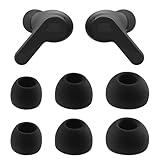
- Ear Tips: Typically made of silicone or foam, these are the parts that create a seal in your ear canal. They come in various sizes.
- Charging Case (for True Wireless): This case stores and charges the earbuds.
- Charging Cable (USB-C or Micro-USB): Used to charge the charging case.
- Controls: Buttons or touch-sensitive surfaces on the earbuds for controlling music playback, answering calls, and adjusting volume.
Choosing the Right Ear Tips
The ear tips are arguably the most critical component for a comfortable and secure fit. The wrong size can lead to discomfort, poor sound quality, and the earbuds falling out. JBL often includes multiple sizes of ear tips, so experiment to find the perfect match.
Why Ear Tip Size Matters
The right ear tip size is vital for several reasons:
- Comfort: Too small, and the earbuds might feel loose and require constant readjustment. Too large, and they can cause pressure and pain.
- Sound Quality: A proper seal is essential for optimal bass response and noise isolation. A poor seal allows sound to leak, diminishing the audio experience.
- Noise Isolation: A good fit blocks out external noise, allowing you to immerse yourself in your music or calls.
- Security: The right size ensures the earbuds stay securely in your ears, even during physical activities.
How to Determine Your Ear Tip Size
Finding the right size is a process of trial and error. Here’s a step-by-step guide:
- Examine the Included Ear Tips: JBL usually provides small, medium, and large ear tips. Some models may include extra-small or extra-large sizes.
- Start with Medium: This is the most common size and a good starting point.
- Gently Insert the Earbud: Insert the earbud into your ear, twisting slightly to help it settle.
- Assess the Fit:
- Comfort: Does it feel snug but not painful?
- Sound Quality: Is the bass present and clear? Can you hear the details in your music?
- Noise Isolation: Can you hear external sounds clearly, or are they muffled?
- Try Different Sizes: If the medium size doesn’t feel right, try the small or large sizes.
- Repeat the Assessment: Go through the same comfort, sound quality, and noise isolation checks with each size.
- Test in Different Environments: Wear the earbuds in various settings (e.g., walking, exercising, commuting) to ensure they stay secure and comfortable.
Tips for Choosing the Right Ear Tips
- Consider the Shape of Your Ears: Some people have smaller ear canals, while others have larger ones.
- Check for a Seal: Gently cup your hands over your ears. If the sound changes dramatically, you likely have a good seal.
- Be Patient: It might take a few tries to find the perfect fit. Don’t give up!
- Experiment with Foam Tips: Some JBL models offer foam ear tips, which expand to conform to your ear canal, often providing a more secure fit and better noise isolation.
- Clean Your Ear Tips Regularly: This prevents the build-up of earwax and other debris, which can affect the fit and sound quality.
Inserting Your Jbl Earbuds Correctly
Once you’ve chosen the right ear tips, the next step is inserting the earbuds properly. The technique varies slightly depending on the type of earbud, but the general principles remain the same.
Inserting True Wireless Earbuds
- Identify Left and Right: Look for the “L” and “R” markings on the earbuds.
- Angle the Earbud: Gently angle the earbud towards your ear canal.
- Insert and Twist: Insert the ear tip into your ear canal and gently twist the earbud forward or backward until it feels secure and comfortable. The goal is to create a good seal.
- Check for Stability: Give your head a shake to ensure the earbuds stay in place.
- Adjust as Needed: If the fit isn’t perfect, remove the earbud and try again, adjusting the angle or position.
Inserting Wireless Neckband Earbuds
- Position the Neckband: Place the neckband around your neck.
- Identify Left and Right: Check the “L” and “R” markings on the earbuds.
- Insert the Earbuds: Insert the ear tips into your ear canals.
- Secure the Fit: Some neckband earbuds have stabilizers or fins that help secure the fit. Adjust these as needed.
- Adjust the Cable Length: If the cable is adjustable, make sure it’s at a comfortable length.
Inserting Wired Earbuds
- Identify Left and Right: Look for the “L” and “R” markings.
- Angle the Earbud: Angle the earbud towards your ear canal.
- Insert and Twist: Insert the ear tip into your ear canal, twisting slightly for a secure fit.
- Manage the Cable: Route the cable down your shirt or behind your ear to prevent it from getting in the way.
Troubleshooting Common Issues
Even with the best fit, you might encounter some issues. Here’s how to troubleshoot them:
Earbuds Keep Falling Out
- Try a Different Ear Tip Size: This is the most common solution. Experiment with different sizes until you find the one that fits securely.
- Adjust the Insertion Technique: Make sure you’re inserting the earbuds correctly, as described above. A slight adjustment in angle can make a big difference.
- Use Ear Hooks or Fins: Some JBL earbuds come with ear hooks or fins that provide extra stability, especially during workouts.
- Consider a Different Earbud Design: If you consistently struggle with earbuds falling out, consider trying a different design, such as over-ear headphones or earbuds with ear hooks.
Poor Sound Quality
- Ensure a Proper Seal: A good seal is crucial for optimal sound quality. Make sure the ear tips are creating a tight seal in your ear canals.
- Clean the Ear Tips: Earwax and debris can block the sound and reduce audio quality. Clean the ear tips regularly.
- Check the Volume: Make sure the volume isn’t too low.
- Check Your Device’s EQ Settings: Your device’s equalizer settings can affect the sound quality. Experiment with different presets or customize the settings to your liking.
- Try Different Audio Sources: Sometimes, the issue is with the audio source (e.g., a low-quality recording). Test the earbuds with different music, podcasts, or videos.
Discomfort
- Choose the Right Ear Tip Size: This is the most important factor in comfort. Too large can cause pressure, and too small can be loose.
- Adjust the Insertion Depth: Don’t push the earbuds too far into your ear canals.
- Take Breaks: If you experience discomfort after prolonged use, take a break and let your ears rest.
- Consider Alternative Ear Tips: If silicone tips are uncomfortable, try foam tips.
One Earbud Isn’t Working
- Check the Connection: For true wireless earbuds, make sure both earbuds are connected to your device. Sometimes, only one earbud connects.
- Check the Balance Settings: Make sure the balance isn’t skewed to one side in your device’s audio settings.
- Clean the Earbuds: Debris can sometimes block the sound. Clean the earbuds gently.
- Charge the Earbuds: Make sure both earbuds are fully charged.
- Reset the Earbuds: Consult your JBL earbuds’ manual for instructions on how to reset them. This can often resolve connection issues.
Bluetooth Connection Issues
- Ensure Bluetooth is Enabled: Make sure Bluetooth is turned on on your device.
- Check Pairing: Make sure your earbuds are paired with your device.
- Move Closer to Your Device: Bluetooth has a limited range. Move closer to your device if you’re experiencing connection issues.
- Restart Your Devices: Restart your device and your earbuds.
- Update Firmware: Check for firmware updates for your earbuds and install them if available.
- Unpair and Re-pair: Try unpairing the earbuds from your device and then re-pairing them.
Advanced Tips for Jbl Earbud Users
Once you’ve mastered the basics, here are some advanced tips to enhance your JBL earbud experience:
Maximizing Sound Quality
- Experiment with EQ Settings: Most devices have equalizer settings that allow you to adjust the sound. Experiment with different presets (e.g., “Rock,” “Pop,” “Jazz”) or customize the settings to your preferences.
- Listen to High-Quality Audio: The quality of your audio source affects the sound you hear. Listen to high-resolution audio files or stream from services that offer high-fidelity audio.
- Consider Noise Cancellation (If Applicable): Some JBL earbuds feature noise cancellation. Experiment with this feature to block out external sounds and enhance the audio experience.
Caring for Your Jbl Earbuds
- Clean Regularly: Clean your earbuds and ear tips regularly to remove earwax, debris, and sweat. Use a soft, dry cloth or a cotton swab. Avoid using water or harsh chemicals.
- Store Properly: When not in use, store your earbuds in their charging case (for true wireless) or a protective case to prevent damage.
- Protect from Moisture: While many JBL earbuds are water-resistant, avoid exposing them to excessive moisture.
- Charge Regularly: Charge your earbuds regularly to prevent the battery from depleting completely.
Using Jbl Earbuds for Calls
- Position the Microphone Correctly: Most JBL earbuds have a built-in microphone. Position the microphone towards your mouth for clear voice transmission.
- Reduce Background Noise: In noisy environments, try to minimize background noise to ensure clear calls.
- Use Noise Cancellation (If Applicable): Noise cancellation can help reduce background noise during calls.
Utilizing Jbl App Features (if Applicable)
Some JBL earbuds have companion apps that offer additional features and customization options. Download the app for your specific model to explore these features.
- Customize Controls: Many apps allow you to customize the controls on your earbuds (e.g., single tap, double tap, long press).
- Update Firmware: The app often provides firmware updates for your earbuds.
- Adjust EQ Settings: Some apps offer more advanced EQ settings than your device’s built-in settings.
- Find My Earbuds: Some apps have a feature that helps you locate your earbuds if you misplace them.
Comparing Ear Tip Materials: Silicone vs. Foam
The material of your ear tips significantly impacts comfort, sound quality, and noise isolation. Here’s a comparison of silicone and foam tips:
| Feature | Silicone Ear Tips | Foam Ear Tips |
|---|---|---|
| Comfort | Can be comfortable for some, but may cause pressure for others. | Often more comfortable due to the conforming nature of the foam. |
| Sound Quality | Good sound quality with a proper seal. May allow some sound leakage. | Generally better noise isolation and improved bass response due to the tighter seal. |
| Noise Isolation | Moderate noise isolation. | Excellent noise isolation. |
| Durability | More durable and long-lasting. | Less durable and need to be replaced more frequently. |
| Maintenance | Easier to clean. | Absorbs earwax and debris, requiring more frequent cleaning or replacement. |
| Breathability | More breathable. | Less breathable, which may cause some users to feel a bit of pressure or warmth in the ear. |
Choosing between silicone and foam tips depends on your personal preferences. If you prioritize comfort and noise isolation, foam tips are a great choice. If you prefer durability and ease of cleaning, silicone tips may be better. Many users keep a supply of both to swap out depending on the activity or environment.
Wearing Jbl Earbuds During Exercise
JBL earbuds are often designed for active lifestyles. Here’s how to wear them during exercise:
- Choose the Right Ear Tips: Select ear tips that fit securely and comfortably, even during movement. Consider using ear tips with fins or hooks for extra stability.
- Adjust the Fit: Make sure the earbuds are properly inserted and secure before you start your workout.
- Manage the Cable (If Applicable): If you’re using wired earbuds, route the cable behind your ear or down your shirt to prevent it from getting in the way.
- Use Sweat-Resistant Models: If you plan to sweat a lot, choose JBL earbuds that are sweat-resistant or waterproof.
- Clean After Exercise: After your workout, clean your earbuds to remove sweat and debris.
Final Thoughts
By following these steps, you’ll be well on your way to enjoying your JBL earbuds to the fullest. Remember, finding the perfect fit is key to a great listening experience. Take your time, experiment with different ear tips, and don’t hesitate to consult the JBL website or your earbuds’ manual for more specific instructions. Happy listening!
Wearing JBL earbuds might seem simple, but the key to a great experience lies in finding the perfect fit and understanding the nuances of your specific model. Remember to start with the basics: choosing the right ear tips, inserting the earbuds correctly, and troubleshooting any issues that arise.
With a little patience and experimentation, you’ll be able to enjoy your music, podcasts, and calls with optimal comfort and sound quality. Embrace the process, and you’ll discover the true potential of your JBL earbuds. Enjoy your new audio experience!
Recommended Products