How to Connect Two Earbuds to One Phone: A Complete Guide
Ever wanted to share your music or listen to a podcast with a friend, but only had one phone and two sets of earbuds? It’s a common scenario, and thankfully, it’s often possible to connect two earbuds to one phone simultaneously. Whether you’re traveling with a companion, watching a movie on a plane, or just sharing your favorite tunes, knowing how to do this can significantly enhance your audio experience.
This guide will walk you through the various methods, from the simplest techniques to more advanced solutions, covering both Android and iOS devices. We’ll explore the advantages and disadvantages of each approach, ensuring you can choose the best option for your specific needs and the type of earbuds you have. Get ready to learn how to share your audio effortlessly and enjoy your content together.
We’ll also look at potential troubleshooting steps for when things don’t go as planned. So, grab your earbuds, and let’s get started. By the end of this guide, you’ll be well-equipped to connect two earbuds to one phone and enjoy shared audio experiences.
Understanding the Basics: Why Connect Two Earbuds?
Connecting two earbuds to a single phone opens up a world of possibilities. Primarily, it’s about sharing audio. This could be anything from watching a movie together on a tablet during a flight, listening to the same podcast while commuting, or simply enjoying music with a friend. It’s a convenient way to share your audio without needing a speaker or disturbing those around you.
Beyond sharing, there are also practical applications. For instance, if you’re using your phone for a video conference and need to have two people listening to the same audio, this setup becomes invaluable. It’s also useful for language learning, where two people can listen to the same lesson simultaneously.
However, it’s important to understand the limitations. Not all phones or earbuds support this functionality natively. Additionally, the quality of the shared audio can sometimes be affected, especially if using older or less advanced devices. We’ll explore these aspects in more detail throughout this guide.
Methods for Connecting Two Earbuds: A Comprehensive Overview
There are several methods you can use to connect two earbuds to one phone. The best approach depends on your phone’s operating system (Android or iOS), the type of earbuds you have (Bluetooth or wired), and any additional accessories you might need. Let’s delve into the most common methods:
1. Using Bluetooth Settings (native Support)
Many modern smartphones, particularly those running Android, have built-in support for connecting to multiple Bluetooth audio devices simultaneously. This feature is often referred to as ‘Dual Audio’ or something similar. Here’s how to check if your phone supports this feature and how to use it:
Android Devices:
- Check for Dual Audio: Go to your phone’s settings. Look for an option like ‘Bluetooth’, ‘Connections’, or ‘Sound and vibration’. Within these settings, search for ‘Dual Audio’, ‘Multiple Audio’, or a similar term. If you find it, your phone likely supports connecting to two Bluetooth audio devices.
- Pair the Earbuds: Ensure both sets of earbuds are in pairing mode. Typically, this involves holding down a button on the earbuds until a light flashes or a voice prompt indicates they’re ready to connect. Go to your phone’s Bluetooth settings and select each set of earbuds from the list of available devices.
- Connect Both Earbuds: Once both earbuds are paired, your phone should allow you to connect both simultaneously. You may see two separate entries for your earbuds in the Bluetooth settings, or a single entry that allows you to connect multiple devices. Tap ‘Connect’ or a similar option for each set of earbuds.
- Adjust Volume: After connecting, you may be able to control the volume for each set of earbuds individually. Check your phone’s volume controls or Bluetooth settings for these options.
iOS Devices (iphone/ipad):
iOS devices also support connecting to multiple Bluetooth devices. The process is similar to Android:
- Pair the Earbuds: Put both sets of earbuds into pairing mode. Go to your iPhone or iPad’s settings and select ‘Bluetooth’.
- Connect the Earbuds: Select each set of earbuds from the list of available devices. Once connected, both earbuds should play audio.
- Adjust Volume: You can adjust the volume using the volume buttons on your iPhone/iPad or through the control center.
2. Using Apps for Dual Audio (android Only)
If your Android phone doesn’t natively support dual audio, you can often use third-party apps to achieve the same result. These apps essentially route the audio signal to multiple Bluetooth devices. One popular example is ‘Bluetooth Audio Manager’, but there are several others available in the Google Play Store. Here’s how to use such an app:
- Download and Install: Search for a dual audio app in the Google Play Store and install it on your phone.
- Grant Permissions: The app will likely require certain permissions, such as access to your Bluetooth settings and audio output. Grant these permissions when prompted.
- Pair the Earbuds: Put both sets of earbuds into pairing mode and pair them with your phone through the app’s interface.
- Enable Dual Audio: Within the app, there should be an option to enable dual audio or select multiple output devices. Select both sets of earbuds.
- Test the Connection: Play some audio and check if it’s playing through both sets of earbuds.
Important Note: The performance of these apps can vary depending on the phone model, Android version, and the earbuds themselves. Some apps may introduce latency or other audio quality issues.
3. Using a Bluetooth Transmitter/splitter
If your phone doesn’t support dual audio and you prefer not to use third-party apps, or if you’re using a device without Bluetooth, a Bluetooth transmitter/splitter is a viable solution. This device plugs into your phone’s headphone jack (if your phone has one) or connects via Bluetooth and transmits the audio signal to two sets of Bluetooth earbuds.
Here’s how it works:
- Connect the Transmitter: Plug the Bluetooth transmitter into your phone’s headphone jack or pair it with your phone via Bluetooth.
- Pair the Earbuds: Put both sets of Bluetooth earbuds into pairing mode. The transmitter will then connect to both sets of earbuds.
- Enjoy Audio: Once the earbuds are connected to the transmitter, they will both receive the audio signal from your phone.
Advantages:
- Works with phones that don’t support dual audio.
- Can be used with wired headphones by plugging them into the transmitter.
Disadvantages:
- Requires an additional device.
- May introduce slight latency.
- The quality of the audio can depend on the quality of the transmitter.
4. Using a Wired Splitter
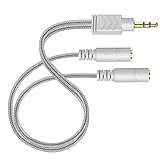
For phones with a headphone jack (3.5mm), a simple wired audio splitter is the most straightforward solution. This inexpensive device plugs into the headphone jack and has two or more output jacks, allowing you to connect two sets of wired earbuds.
Here’s how it works:
- Plug in the Splitter: Insert the audio splitter into your phone’s headphone jack.
- Connect the Earbuds: Plug one set of wired earbuds into each output jack on the splitter.
- Enjoy Audio: Audio from your phone will now be sent to both sets of earbuds.
Advantages:
- Simple and inexpensive.
- No latency issues.
- Works with any phone that has a headphone jack.
Disadvantages:
- Only works with wired earbuds.
- Requires a headphone jack on your phone.
5. Combining Bluetooth and Wired Earbuds
It’s also possible to combine Bluetooth and wired earbuds using a combination of the above methods. For example, if your phone supports dual audio, you can connect one set of Bluetooth earbuds directly and use a wired splitter for two sets of wired earbuds. Alternatively, you could use a Bluetooth transmitter that also has a 3.5mm output for one set of wired earbuds.
Troubleshooting Common Issues
Connecting two earbuds to one phone can sometimes present challenges. Here are some common issues and how to resolve them:
1. Earbuds Not Pairing
If your earbuds are not pairing, make sure they are in pairing mode (usually indicated by a flashing light). Also, check that your phone’s Bluetooth is turned on and that the earbuds are within range. Try restarting both your phone and the earbuds. If the problem persists, try forgetting the earbuds from your phone’s Bluetooth settings and then re-pairing them.
2. Only One Earbud Playing Audio
This is a common issue, especially with Bluetooth connections. First, ensure that both earbuds are properly connected and that your phone is set to output audio to both devices. Check your phone’s Bluetooth settings to see if it shows both earbuds as connected. If you’re using a third-party app, make sure it’s configured to output audio to both devices. Also, make sure that the balance isn’t skewed heavily to one side in your phone’s audio settings.
3. Audio Quality Issues
Bluetooth connections can sometimes suffer from audio quality issues, such as static, dropouts, or low volume. Make sure both your phone and the earbuds are fully charged. Reduce the distance between your phone and the earbuds. Try to minimize interference from other electronic devices. If you’re using a Bluetooth transmitter, ensure it’s of good quality. Consider using a wired connection if audio quality is a top priority.
4. Latency or Delay
Latency, or a delay between the audio and video, can be noticeable, especially when watching videos. This is more common with Bluetooth connections. Unfortunately, there’s no perfect solution for this issue, but you can try the following: ensure your earbuds and phone support the latest Bluetooth codecs (like aptX or AAC), which can reduce latency. Minimize the distance between your phone and the earbuds. Some apps or devices may have settings to adjust the audio delay; experiment with these if available.
5. One Earbud Has Lower Volume
If one earbud has a lower volume than the other, check your phone’s balance settings. These settings can sometimes be inadvertently adjusted. Also, ensure that the earbuds are clean and that there’s no debris blocking the sound output. Try resetting the earbuds to their factory settings. If the problem persists, the earbud might have a hardware issue.
Choosing the Right Method for You
The best method for connecting two earbuds depends on your specific needs and the equipment you have. Here’s a quick guide to help you choose:
| Method | Pros | Cons | Best For |
|---|---|---|---|
| Native Bluetooth Dual Audio | Simple, no extra hardware needed. Best audio quality. | Requires phone support. | Sharing audio with friends, watching movies, listening to music on newer Android and iOS devices. |
| Third-Party Apps (Android) | Works even if your phone doesn’t have native support. | May have audio quality issues or latency. Requires downloading an app. | Older Android phones without native dual audio support. |
| Bluetooth Transmitter/Splitter | Works with any phone. Can connect to wired earbuds. | Requires an additional device. May have some latency or audio quality degradation. | Phones without dual audio support, or when needing to connect wired and wireless earbuds. |
| Wired Splitter | Simple, inexpensive, no latency. | Only works with wired earbuds. Requires a headphone jack. | Sharing audio with wired earbuds. |
Consider the following factors when making your decision:
- Your Phone’s Capabilities: Does your phone have native dual audio support? Does it have a headphone jack?
- Your Earbuds: Are they Bluetooth or wired?
- Your Needs: How important is audio quality? Is latency a concern?
- Budget: How much are you willing to spend on additional accessories?
Once you’ve successfully connected two earbuds to your phone, there are a few things you can do to enhance the experience:
- Adjust Volume Levels: Ensure that the volume is comfortable for both listeners. Some phones or apps allow you to adjust the volume for each set of earbuds individually.
- Choose High-Quality Audio: If possible, stream audio in a high-quality format to ensure the best possible listening experience.
- Minimize Interference: Keep your phone and earbuds close together and away from other electronic devices that could cause interference.
- Test the Connection: Before settling in for a long listening session, test the connection to make sure everything is working correctly.
- Consider Earbud Types: If you’re sharing audio regularly, consider the type of earbuds you and your friend prefer. Some people prefer in-ear earbuds, while others prefer over-ear headphones.
By following these tips, you can ensure a smooth and enjoyable shared audio experience.
The technology behind shared audio is constantly evolving. We can expect to see several trends in the future:
- Improved Bluetooth Codecs: Bluetooth technology will continue to improve, with new codecs designed to reduce latency and improve audio quality.
- More Seamless Integration: Phone manufacturers will likely integrate dual audio features more seamlessly into their operating systems, making it easier to connect and manage multiple audio devices.
- Spatial Audio: Spatial audio technology, which creates a more immersive listening experience, is becoming more prevalent. In the future, we may see more shared spatial audio experiences.
- Smart Earbuds: Smart earbuds with advanced features, such as noise cancellation and personalized audio profiles, are becoming increasingly common. These features will enhance the shared listening experience.
As technology advances, we can expect even more convenient and immersive ways to share audio with friends and family.
Conclusion
Connecting two earbuds to one phone is a practical and convenient way to share your audio. Whether you opt for native Bluetooth support, third-party apps, a Bluetooth transmitter, or a simple wired splitter, several methods enable you to share music, podcasts, or movies with a friend. By understanding the different approaches and troubleshooting common issues, you can ensure a smooth and enjoyable shared listening experience.
Remember to consider your phone’s capabilities, your earbuds’ type, and your specific needs when choosing the best method for you. Experiment with different options, and don’t hesitate to troubleshoot any issues that arise. With the right setup, you can easily share your audio and enjoy listening together. As technology continues to evolve, we can anticipate even more innovative and seamless ways to experience shared audio in the future.
Recommended Products