How to Connect Earbuds to Airplane TV: A Complete Guide
Ah, the joys of air travel. The cramped seats, the recycled air, and the endless hours of… well, sometimes boredom. Thankfully, most modern airplanes offer in-flight entertainment, a welcome distraction from the monotony of long flights. But what if you’re not a fan of the provided headphones? What if you prefer the comfort and quality of your own earbuds? Or maybe the airplane headphones are broken, or simply missing.
Connecting your earbuds to the airplane TV can seem tricky at first, but with a little know-how, it’s a breeze. This guide will walk you through everything you need to know, from understanding the different audio jack types to the various adapters and methods available. We’ll cover wired and wireless options, troubleshooting tips, and even some clever workarounds. So, grab your favorite earbuds, settle in, and let’s get you connected for a more enjoyable flight!
Whether you’re a seasoned traveler or a first-time flyer, this guide has you covered. We’ll explore the common audio jack configurations found on airplanes, the best adapters to use, and how to connect Bluetooth earbuds. Get ready to transform your in-flight entertainment experience!
Understanding Airplane Audio Jacks
Before you can connect your earbuds, you need to understand the different audio jack configurations you might encounter on an airplane. Airplane entertainment systems aren’t always standardized, so you’ll likely come across a few different types.
The Standard Dual-Prong Jack
This is the most common type of audio jack found on airplanes. It features two separate jacks, often side-by-side or stacked on top of each other. These jacks are designed for the two-pronged airplane headphones provided by the airline. The two prongs are essentially two mono audio channels (left and right) for stereo sound.
Why Two Prongs? The dual-prong design is a legacy system. It prevents passengers from accidentally yanking out the headphone jack during the flight, which could interrupt the audio for everyone else. It also provides a more secure connection.
How to Identify: Look for two separate holes, usually located in the armrest of your seat or on the screen itself. They may be labeled with a headphone symbol.
The Single 3.5mm Jack
More modern aircraft are starting to use the standard 3.5mm (1/8 inch) audio jack, the same type found on most smartphones, tablets, and laptops. This is a much more convenient option, as it allows you to directly plug in your own earbuds without any special adapters.
Why the Shift? The move towards single 3.5mm jacks reflects the increasing use of personal devices and the desire for a more user-friendly experience. It simplifies the connection process and allows passengers to use their preferred audio devices.
How to Identify: This is a single, circular hole, just like the one on your phone. It will also be marked with a headphone symbol.
The Hybrid Jack
Some airplanes have hybrid jacks that can accommodate both dual-prong airplane headphones and standard 3.5mm plugs. These jacks are designed to offer compatibility with a wider range of devices.
How to Identify: These jacks often look like a single 3.5mm jack with extra space around the edges or a recessed design that can accommodate the dual-prong connectors.
Wired Connection Methods: Using Adapters
If your airplane has dual-prong jacks, you’ll need an adapter to connect your earbuds. Here’s a breakdown of the best wired connection methods:
The Dual-Prong to 3.5mm Adapter
This is the most common and essential adapter for connecting your own earbuds to the airplane’s entertainment system. It converts the dual-prong jacks into a single 3.5mm jack, allowing you to plug in your earbuds directly.
How it Works: The adapter has two prongs on one end that plug into the airplane’s jacks, and a 3.5mm female port on the other end to connect your earbuds.
Where to Buy: These adapters are widely available online (Amazon, eBay, etc.) and in travel stores. They are generally inexpensive.
Tips for Choosing an Adapter:
- Durability: Look for an adapter made from sturdy materials to withstand travel.
- Compact Size: Choose a small and lightweight adapter for easy portability.
- Brand Reputation: Consider purchasing from a reputable brand to ensure quality and reliability.
The 3.5mm to Dual-Prong Adapter (less Common)
This adapter is less common, but it can be useful if you have airplane headphones and want to use them with a device that has a 3.5mm jack (like your phone or laptop). It does the opposite of the dual-prong to 3.5mm adapter, converting a 3.5mm jack to dual prongs.
How it Works: The adapter has a 3.5mm male plug on one end and two prongs on the other end.
Where to Buy: These adapters are less common, but you can find them online.
Using a Y-Splitter (not Recommended for All Situations)
A Y-splitter can be used in certain situations. It has a single 3.5mm male plug that connects to the airplane’s jack and two 3.5mm female ports to connect two sets of earbuds. This could be useful if you’re traveling with someone and want to share the audio.
Why It’s Not Always Recommended: Using a Y-splitter can sometimes reduce the audio volume, especially if the airplane’s audio output is not very powerful. It’s best to use a Y-splitter as a last resort.
How to Use: Plug the single male end into the airplane’s audio jack and connect your earbuds to the two female ports.
Potential Drawbacks: Volume reduction, potential for audio quality degradation.
Wireless Connection Methods: Bluetooth Earbuds
Bluetooth earbuds offer a convenient and cable-free listening experience. However, connecting them to an airplane’s entertainment system requires a bit more effort. Here’s how to connect your Bluetooth earbuds:
Method 1: Using a Bluetooth Transmitter
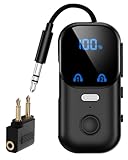
This is the most reliable method for connecting Bluetooth earbuds to an airplane entertainment system. A Bluetooth transmitter plugs into the airplane’s audio jack (either dual-prong or 3.5mm) and transmits the audio signal to your Bluetooth earbuds.
How it Works:
- Plug in the Transmitter: Connect the Bluetooth transmitter to the airplane’s audio jack using the appropriate adapter (dual-prong to 3.5mm if needed).
- Power On and Pair: Turn on the Bluetooth transmitter and put it into pairing mode. Then, put your Bluetooth earbuds into pairing mode.
- Connect: The transmitter and earbuds should automatically connect. If not, consult the manuals for both devices.
Where to Buy: Bluetooth transmitters are readily available online and in electronics stores.
Tips for Choosing a Bluetooth Transmitter:
- Codec Support: Look for a transmitter that supports the aptX or aptX HD codecs for higher audio quality.
- Battery Life: Choose a transmitter with a long battery life to avoid needing to recharge during the flight.
- Size and Portability: Opt for a compact and lightweight transmitter.
Method 2: If the Airplane Has Bluetooth
Some newer airplanes are equipped with Bluetooth functionality, allowing you to connect your Bluetooth earbuds directly to the in-flight entertainment system.
How to Connect:
- Access the Entertainment System Menu: On the airplane’s screen, navigate to the audio settings or Bluetooth settings.
- Enable Bluetooth: Turn on Bluetooth if it’s not already enabled.
- Pair Your Earbuds: Put your Bluetooth earbuds into pairing mode and select them from the list of available devices on the screen.
- Connect: Follow the on-screen prompts to connect your earbuds.
Troubleshooting: If you can’t find Bluetooth settings, the airplane may not have Bluetooth enabled.
Method 3: Using a Bluetooth Adapter with a 3.5mm Input
This method involves using a Bluetooth adapter that plugs into the 3.5mm audio jack. This is similar to using a Bluetooth transmitter, but it can be more compact.
How it Works:
- Plug in the Adapter: Connect the Bluetooth adapter to the 3.5mm audio jack.
- Power On and Pair: Turn on the Bluetooth adapter and put it into pairing mode. Then, put your Bluetooth earbuds into pairing mode.
- Connect: The adapter and earbuds should connect automatically.
Where to Buy: You can find these adapters online and in electronics stores.
Troubleshooting Common Issues
Even with the right equipment, you might encounter some issues when connecting your earbuds to the airplane TV. Here’s how to troubleshoot common problems:
No Sound or Low Volume
Possible Causes and Solutions:
- Incorrect Connection: Make sure the adapter is securely plugged into both the airplane’s audio jack and your earbuds.
- Volume Settings: Check the volume on both the airplane’s screen and your earbuds. Increase the volume if necessary.
- Adapter Issues: Try a different adapter. A faulty adapter can prevent audio from transmitting.
- Earbud Issues: Test your earbuds with another device to ensure they are working properly.
- Airplane System Issues: Sometimes, the airplane’s entertainment system may have issues. Try another screen or ask a flight attendant for assistance.
Only One Earbud Working
Possible Causes and Solutions:
- Adapter Issues: Ensure the adapter is fully seated in the audio jack.
- Earbud Issues: Check your earbud’s balance settings on your phone or other device. Sometimes the balance is skewed to one side.
- Airplane System Issues: The airplane’s audio output might be faulty. Try a different screen.
Bluetooth Connection Problems
Possible Causes and Solutions:
- Pairing Issues: Make sure both your Bluetooth transmitter/adapter and your earbuds are in pairing mode.
- Interference: Try moving closer to the transmitter/adapter.
- Distance: Bluetooth has a limited range. Ensure you are within range of the transmitter/adapter.
- Battery: Make sure both devices have sufficient battery power.
- Reset: Try resetting both the transmitter/adapter and your earbuds.
Audio Quality Issues
Possible Causes and Solutions:
- Codec Support: If using a Bluetooth transmitter, make sure it supports high-quality audio codecs like aptX or aptX HD.
- Interference: External interference can affect audio quality. Minimize interference by keeping your devices away from other electronics.
- Airplane System Issues: The airplane’s audio system might be the source of the problem.
Tips for a Better Experience
Here are some additional tips to enhance your in-flight entertainment experience:
- Test Before You Fly: Before your flight, test your earbuds and adapters with another device to ensure they are working correctly. This will prevent any last-minute surprises.
- Bring Extra Batteries: If you’re using a Bluetooth transmitter, bring a portable charger or extra batteries to keep it powered throughout the flight.
- Pack Smart: Keep your adapters and Bluetooth transmitter in an easily accessible place in your carry-on bag.
- Consider Noise-Canceling Earbuds: Noise-canceling earbuds can significantly improve your listening experience by blocking out ambient noise from the airplane.
- Ask for Help: If you’re having trouble, don’t hesitate to ask a flight attendant for assistance. They are often familiar with the entertainment system and can offer helpful advice.
- Be Considerate: Keep the volume at a reasonable level to avoid disturbing other passengers.
Alternative Solutions and Workarounds
Sometimes, despite your best efforts, you might encounter situations where your preferred setup doesn’t work. Here are some alternative solutions and workarounds:
Using the Airplane’s Headphones
If all else fails, you can always use the airplane’s provided headphones. While they might not be your first choice in terms of audio quality or comfort, they will allow you to enjoy the in-flight entertainment.
Advantages: Readily available, no need for adapters or extra devices.
Disadvantages: Lower audio quality, potential discomfort, may not fit comfortably.
Borrowing Headphones
If you’re traveling with someone, you might be able to borrow their headphones. This can be a good option if you forgot your own or are having trouble connecting your earbuds.
Advantages: Convenient if you’re traveling with others.
Disadvantages: Requires someone to share their headphones.
Using a Portable Media Player
If you have downloaded movies, music, or podcasts on a portable media player (like a phone or tablet), you can use your own earbuds to enjoy your content. This can be a great alternative if the airplane’s entertainment system isn’t working or if you simply prefer your own content.
Advantages: Complete control over your content, personalized entertainment.
Disadvantages: Requires pre-downloading content, may drain your device’s battery.
Reading or Sleeping
Sometimes, the best solution is to simply take a break from the entertainment. Reading a book, listening to a podcast, or getting some sleep can be a relaxing way to pass the time on a flight.
Advantages: No need for any devices or adapters.
Disadvantages: Not always the most exciting option.
Frequently Asked Questions (faq)
Here are answers to some of the most common questions about connecting earbuds to airplane TVs:
Can I Use Any Type of Earbuds on an Airplane?
Yes, you can generally use any type of earbuds, but you may need an adapter depending on the airplane’s audio jack configuration. The most common adapter is a dual-prong to 3.5mm adapter.
Do I Need a Special Adapter for Bluetooth Earbuds?
Yes, if the airplane doesn’t have built-in Bluetooth, you’ll need a Bluetooth transmitter or a Bluetooth adapter with a 3.5mm input to connect your Bluetooth earbuds.
Are There Any Safety Concerns with Using Earbuds on an Airplane?
There are no major safety concerns, but it’s important to be aware of your surroundings. Keep the volume at a reasonable level to hear any announcements from the flight crew. Also, be mindful of the cable if using wired earbuds to avoid tripping hazards.
Can I Charge My Bluetooth Transmitter During the Flight?
Yes, most Bluetooth transmitters can be charged via USB. You can use a portable charger or the airplane’s USB port (if available) to charge your transmitter.
What If the Airplane’s Audio Jack Is Broken?
If the airplane’s audio jack is broken, you can ask a flight attendant for assistance. They may be able to offer a replacement headphone or help you troubleshoot the issue. You can also use alternative methods like a portable media player or the airplane’s headphones.
Final Verdict
Connecting your earbuds to an airplane TV is a straightforward process once you understand the different audio jack types and the available connection methods. Whether you opt for a wired connection with an adapter or a wireless solution using Bluetooth, you can significantly enhance your in-flight entertainment experience. Remember to pack the right adapters, test your equipment before your flight, and troubleshoot any issues that may arise. With a little preparation, you can enjoy your favorite movies, music, and shows with the comfort and quality of your own earbuds.
By following the steps outlined in this guide, you can ensure a more enjoyable and personalized in-flight entertainment experience. Happy travels, and enjoy your flight!
Recommended Products