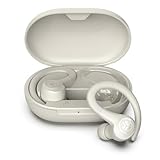
How Long Does Jlab Earbuds Battery Last? A Deep Dive
Hey there! If you’re anything like me, you live for your music, podcasts, and audiobooks. And if you’re rocking a pair of JLab earbuds, you’re probably wondering one thing: how long will these things last on a single charge? It’s a valid question. Nobody wants their tunes to cut out mid-workout or during a crucial phone call.
We’re going to explore the battery life of various JLab earbuds models, factors that affect their longevity, and some tips to maximize your listening time. I’ll break down the specifics, so you can make the most of your JLab experience. Ready to get the lowdown on JLab earbuds battery life?
Let’s dive in and find out!
Understanding Jlab Earbuds Battery Life: The Basics
Before we get into the nitty-gritty, let’s establish some fundamentals. JLab earbuds, like most wireless audio devices, rely on rechargeable lithium-ion batteries. The battery life is usually measured in hours of playback time. This represents how long you can listen to audio before needing to recharge your earbuds.
Factors that Influence Battery Life:
- Volume Level: Listening at higher volumes drains the battery faster.
- Bluetooth Connectivity: Constantly maintaining a stable Bluetooth connection consumes power.
- Environmental Factors: Extreme temperatures can affect battery performance.
- Codec Used: Some audio codecs are more power-efficient than others.
- Features Used: Active Noise Cancellation (ANC), if available, significantly reduces battery life.
It’s important to remember that the advertised battery life is often an estimate, and real-world performance may vary based on these factors. Let’s delve into the battery life of different JLab earbud models.
Jlab Earbuds Battery Life: Model-Specific Breakdown
JLab offers a diverse range of earbuds, and the battery life varies between models. Here’s a look at some of the popular options:
Jlab Go Air Series
The Go Air series is known for its compact design and affordability. The battery life is generally decent for its price point.
- Go Air POP: Offers around 8 hours of playback on a single charge for the earbuds, and the charging case provides an additional 24+ hours.
- Go Air Sport: Provides up to 8 hours of playtime in the earbuds, with the case adding an extra 32+ hours.
- Go Air: Delivers around 8 hours of playtime in the earbuds, with the case providing an additional 24+ hours.
The Go Air series is a great choice if you need a good balance of portability and battery life.
Jlab Jbuds Series
The JBuds series usually offers a step up in features and performance, and the battery life reflects this.
- JBuds Air Pro: You can expect around 9 hours of playtime from the earbuds, and the charging case provides an additional 30+ hours. They also feature ANC, which, when enabled, reduces the battery life somewhat.
- JBuds Air Executive: Similar to the Pro, they offer around 8 hours of playtime in the earbuds and the case provides an additional 24+ hours.
- JBuds Air Play: Delivers around 6.5 hours of playtime in the earbuds, with an additional 24+ hours from the case.
The JBuds series is a solid choice if you’re looking for enhanced features and longer battery life.
Jlab Epic Series
The Epic series is positioned as a higher-end option, with features designed for more active lifestyles.
- Epic Air Sport ANC: Offers approximately 12 hours of playtime in the earbuds with ANC off, and the charging case provides an additional 48+ hours. With ANC on, the earbud battery life is reduced to around 8 hours.
The Epic series is suitable if you need long battery life and robust features for workouts or outdoor activities.
Jlab Studio Series
The Studio series focuses on over-ear headphones, offering excellent battery life for longer listening sessions.
- Studio ANC Wireless Headphones: Boasts an impressive 34+ hours of playtime with ANC off and 24+ hours with ANC on.
These headphones are an excellent choice if you prefer over-ear comfort and need extended battery life for travel or work.
Comparison Table
Here’s a quick comparison of the battery life of some popular JLab earbud models:
| Model | Earbud Playtime | Case Playtime | Features |
|---|---|---|---|
| Go Air POP | 8 hours | 24+ hours | Compact, Affordable |
| Go Air Sport | 8 hours | 32+ hours | Water-resistant, Sport-focused |
| JBuds Air Pro | 9 hours | 30+ hours | ANC, Enhanced Features |
| Epic Air Sport ANC | 12 hours (ANC off), 8 hours (ANC on) | 48+ hours | ANC, Sport-focused |
| Studio ANC Wireless Headphones | 34+ hours (ANC off), 24+ hours (ANC on) | N/A | Over-ear, ANC |
Maximizing Your Jlab Earbuds Battery Life: Tips and Tricks
Want to squeeze every last drop of listening time from your JLab earbuds? Here are some practical tips to help you:
1. Optimize Volume Levels
As mentioned earlier, listening at lower volumes conserves battery power. If you don’t need to crank up the volume, keep it at a moderate level. This can significantly extend the battery life, especially during longer listening sessions.
2. Manage Bluetooth Connectivity
Ensure a stable Bluetooth connection. If your earbuds are constantly searching for a connection or struggling to maintain one, they’ll drain the battery faster. Keep your device within the recommended range and avoid obstructions that might interfere with the signal.
3. Utilize the Charging Case
The charging case is your best friend. Make it a habit to store your earbuds in the case when you’re not using them. This will not only protect your earbuds but also keep them charged and ready to go. The case provides additional charging cycles, extending your overall listening time.
4. Turn Off Features When Not in Use
Disable features like ANC when you don’t need them. ANC is a battery hog. Similarly, if your earbuds have other power-consuming features (like transparency mode), turn them off when they’re not essential. This simple step can add valuable listening hours.
5. Store Earbuds Properly
Avoid exposing your earbuds to extreme temperatures. Heat and cold can negatively impact battery performance. Store your earbuds in a cool, dry place when they’re not in use. This protects the battery and helps maintain its capacity over time.
6. Regularly Clean Your Earbuds
Keep your earbuds clean. Earwax and debris can sometimes affect the charging contacts, preventing them from charging properly. Regularly clean your earbuds with a soft, dry cloth to ensure optimal charging performance.
7. Update Firmware
Check for firmware updates. JLab often releases firmware updates that can optimize battery performance. Make sure your earbuds are running the latest firmware version to benefit from any improvements.
8. Consider Your Codec
If your device supports it, consider using a more power-efficient audio codec. Some codecs consume less power than others. While this might not make a huge difference, it’s a small tweak that could help.
9. Monitor Battery Health
Pay attention to how your earbuds’ battery performs over time. Like all rechargeable batteries, the capacity of your JLab earbuds’ battery will degrade with each charge cycle. If you notice a significant decrease in battery life, it may be time to consider a replacement or contact JLab support.
10. Power Off When Not in Use
Completely power off your earbuds when you know you won’t be using them for an extended period. This prevents them from accidentally connecting to your device and draining the battery in the background.
Charging Your Jlab Earbuds: A Step-by-Step Guide
Charging your JLab earbuds is generally a straightforward process. Here’s a quick guide:
1. Charging the Earbuds
Place the earbuds in their charging case. Make sure they are seated correctly in the charging slots. The case will typically have LED indicators that show the charging status of the earbuds.
2. Charging the Case
Connect the charging case to a power source. Most JLab cases use a USB-C or Micro-USB cable. Plug the cable into the case and a power adapter or a USB port on your computer. The case’s LED indicators will show the charging progress.
3. Charging Time
Charging times vary by model. Refer to the product specifications for the exact charging times. Generally, it takes around 1-2 hours to fully charge the earbuds and the case.
4. Checking the Battery Level
Check the case’s LED indicators. These lights will show you the battery level of both the earbuds and the case. Some models also have voice prompts that announce the battery level when you turn them on.
5. Overcharging
Modern charging systems prevent overcharging. Once the earbuds and case are fully charged, the charging process will stop automatically. You don’t need to worry about damaging the battery by leaving them plugged in for too long.
Troubleshooting Common Battery Issues
Sometimes, you might encounter issues with your JLab earbuds’ battery. Here’s how to troubleshoot common problems:
1. Earbuds Not Charging
Check the charging contacts. Make sure the earbuds are properly seated in the case and that the charging contacts are clean. Try cleaning the contacts with a dry cloth or cotton swab. Also, ensure the charging case itself is charged and connected to a working power source.
2. Case Not Charging
Verify the charging cable and power adapter. Try a different cable and adapter to rule out any issues with the original ones. Also, check the charging port on the case for any debris or damage.
3. Rapid Battery Drain
Check your usage habits. Are you listening at high volumes or using power-intensive features like ANC? Try reducing the volume and disabling unnecessary features. Also, check for firmware updates, as they can sometimes address battery drain issues.
4. Battery Not Holding a Charge
Batteries degrade over time. If your earbuds are old, the battery capacity might have diminished. If the battery life has significantly decreased, consider contacting JLab support for assistance or replacement options.
5. Pairing Problems
Sometimes, pairing issues can affect battery drain. If your earbuds are constantly searching for a connection, they will drain the battery faster. Try resetting the earbuds and repairing them with your device.
Jlab Support and Warranty
If you’re experiencing persistent battery issues or need further assistance, don’t hesitate to contact JLab support. They offer customer service and can help you troubleshoot problems or discuss warranty options.
1. Contacting Jlab Support
Visit the JLab website. You can find contact information, FAQs, and troubleshooting guides. You can typically reach them via email or through a contact form.
2. Warranty Information
Check your warranty details. JLab products usually come with a limited warranty that covers manufacturing defects. Review your warranty information to understand what’s covered and for how long.
3. Repair or Replacement
Depending on the issue and warranty status, JLab might offer repair or replacement options. Be prepared to provide proof of purchase and describe the problem in detail.
Final Verdict
I hope this deep dive into JLab earbuds battery life has been helpful. Understanding the factors that affect battery performance, along with the tips and tricks I’ve shared, can help you get the most out of your listening experience. Remember to manage your volume, utilize your charging case, and take care of your earbuds. Happy listening!
So, there you have it! We’ve covered the ins and outs of JLab earbuds battery life. From the model-specific details to the best ways to maximize your playtime, you’re now equipped to make informed choices and keep your tunes flowing. By following the tips, you can ensure your JLab earbuds keep up with your lifestyle. Enjoy your music!
Recommended Products