How Do You Clean Apple Earbuds? A Comprehensive Guide
Ah, your trusty Apple earbuds. They’re your constant companions, soundtracking your life from the morning commute to the evening workout. But let’s be honest, they take a beating. From earwax and dust to the occasional rogue drop of moisture, your earbuds endure a lot. Over time, these little devices can accumulate grime, impacting sound quality and potentially harboring bacteria.
Cleaning your Apple earbuds isn’t just about aesthetics; it’s about maintaining optimal performance and hygiene. Neglecting this crucial task can lead to muffled audio, reduced clarity, and even potential ear infections. Fortunately, the process is straightforward, and with the right tools and techniques, you can keep your earbuds in tip-top shape. This guide will walk you through everything you need to know, ensuring your listening experience remains pristine.
We’ll cover the tools you’ll need, step-by-step cleaning instructions for both the earbuds themselves and the charging case, and tips for preventing future buildup. So, grab your earbuds and let’s get started. Your ears (and your music) will thank you!
Understanding the Importance of Cleaning Your Apple Earbuds
Before we jump into the ‘how,’ let’s briefly touch on the ‘why.’ Cleaning your Apple earbuds is more important than you might think. It’s not just about appearances; it significantly impacts both performance and your health.
Why Cleaning Matters:
- Sound Quality: Accumulated earwax and debris can clog the speaker grilles, leading to muffled sound, reduced bass, and overall poor audio quality. Cleaning removes these obstructions, restoring the original clarity and fidelity of your music.
- Hygiene: Earbuds come into direct contact with your ears, creating a breeding ground for bacteria and germs. Regular cleaning helps prevent ear infections and promotes good ear hygiene.
- Longevity: Removing accumulated dirt and moisture prevents damage to the delicate components within the earbuds, potentially extending their lifespan. Think of it as preventative maintenance for your tech.
- Charging Case Performance: A clean charging case ensures proper contact with the earbuds for charging. Debris in the case can interfere with charging, leading to frustration and potential battery issues.
The Risks of Neglecting Cleaning:
Ignoring the cleaning process can lead to several problems. Beyond the obvious impact on sound quality, you might experience:
- Ear Infections: Dirty earbuds can harbor bacteria, increasing your risk of developing ear infections like otitis externa (swimmer’s ear).
- Hearing Loss (Temporary): Excessive wax buildup can partially block the ear canal, causing temporary hearing loss or a feeling of fullness in the ear.
- Damaged Components: Moisture and debris can seep into the internal components of the earbuds, potentially causing permanent damage and requiring costly repairs or replacements.
- Poor Charging: Dirty charging contacts in the case or on the earbuds can lead to inconsistent or failed charging.
Now that we’ve established the importance of cleaning, let’s move on to the tools you’ll need.
Essential Tools for Cleaning Your Apple Earbuds
Fortunately, you don’t need any special or expensive equipment to clean your Apple earbuds effectively. Most of the necessary items are readily available around your home. Here’s a list of the essential tools:
1. Soft, Lint-Free Cloth
A microfiber cloth or a soft, lint-free cloth is your primary tool. This is used for gently wiping the exterior surfaces of the earbuds and the charging case. Avoid using abrasive materials that could scratch the plastic.
2. Cotton Swabs (q-Tips)
Cotton swabs are ideal for cleaning hard-to-reach areas, such as the speaker grilles and the crevices around the charging case. Use them with caution to avoid pushing debris further into the earbuds.
3. Isopropyl Alcohol (70% or Higher)
Isopropyl alcohol is an excellent disinfectant and cleaning agent. It’s safe for electronics and effectively removes grime and bacteria. Use it sparingly and apply it to a cotton swab or cloth, never directly to the earbuds.
4. Toothpicks (optional)
A toothpick can be helpful for gently removing stubborn debris from the speaker grilles and other small openings. Be extremely careful not to damage the delicate components.
5. Soft-Bristled Brush (optional)
A soft-bristled toothbrush or a dedicated cleaning brush can be used to gently brush away debris from the speaker grilles and charging case.
6. Compressed Air (optional)
Compressed air can be used to blow away loose debris from the earbuds and charging case. Use it in short bursts to avoid damaging the components.
7. Cleaning Putty or Gel (optional)
Cleaning putty or gel is a reusable, sticky substance that can be pressed onto the earbuds and charging case to lift away dirt and debris. This can be particularly useful for removing dust from hard-to-reach areas.
Important Safety Precautions:
- Never Use Water Directly: Water can damage the internal components of your earbuds. Avoid using excessive moisture.
- Avoid Harsh Chemicals: Do not use bleach, solvents, or other harsh chemicals, as they can damage the plastic and electronics.
- Be Gentle: Apply gentle pressure when cleaning. Avoid forcing anything into the earbuds or charging case.
- Unplug Devices: Before cleaning, unplug your earbuds from any power sources.
- Dry Thoroughly: Ensure all components are completely dry before using your earbuds.
With your tools assembled, you’re now ready to start cleaning. Let’s move on to the step-by-step instructions.
Step-by-Step Guide: How to Clean Your Apple Earbuds
This section provides detailed instructions for cleaning both your Apple earbuds (AirPods, AirPods Pro, AirPods Max, etc.) and their charging case. Follow these steps carefully to ensure a thorough and safe cleaning process.
Cleaning Your Apple Earbuds (the Earbuds Themselves)
- Prepare Your Workspace: Find a well-lit area and gather your cleaning tools. Make sure you have a clean, flat surface to work on.
- Wipe the Exterior: Using a soft, lint-free cloth, gently wipe the exterior surfaces of the earbuds. This includes the stem, the earpiece, and the charging contacts. Remove any visible dust, fingerprints, or smudges.
- Clean the Speaker Grilles: This is a critical step. The speaker grilles are the small mesh-covered openings where the sound comes out. Use a clean, dry cotton swab to gently remove any earwax or debris from these grilles. Avoid pushing the cotton swab too far into the grille. You can also use a soft-bristled brush or a toothpick for stubborn debris, but be very careful.
- Clean the Microphone Ports: Locate the microphone ports on the earbuds. These are usually small openings near the speaker grilles or on the stems. Use a clean, dry cotton swab or a toothpick to gently remove any debris from these ports.
- Disinfect (Optional): If you want to disinfect your earbuds, lightly dampen a cotton swab with 70% or higher isopropyl alcohol. Gently wipe the exterior surfaces of the earbuds, avoiding the speaker grilles and microphone ports. Do not saturate the cotton swab. Allow the earbuds to air dry completely before use.
- Inspect and Repeat: After cleaning, inspect the earbuds for any remaining debris. Repeat the cleaning process if necessary.
Cleaning Your Apple Earbud Charging Case
- Prepare the Case: Open the charging case and remove the earbuds.
- Wipe the Exterior: Using a soft, lint-free cloth, gently wipe the exterior surfaces of the charging case. This includes the lid, the bottom, and the sides. Remove any dust, fingerprints, or smudges.
- Clean the Interior: Use a clean, dry cotton swab to clean the interior of the charging case. Pay close attention to the charging contacts (the metal pins that connect to the earbuds) and the bottom of the case. Gently remove any debris or lint.
- Clean the Charging Contacts: The charging contacts are crucial for proper charging. Use a clean, dry cotton swab or a toothpick to carefully clean these contacts. Avoid bending or damaging the pins.
- Disinfect (Optional): If you want to disinfect the charging case, lightly dampen a cotton swab with 70% or higher isopropyl alcohol. Gently wipe the interior and exterior surfaces of the case, avoiding the charging contacts. Allow the case to air dry completely before use.
- Remove Stubborn Debris: For stubborn debris, you can use a small amount of cleaning putty or gel. Press the putty onto the affected areas to lift away the dirt.
Cleaning Specific Apple Earbud Models
While the general cleaning process is the same for all Apple earbuds, there are slight differences depending on the model. Here’s a brief overview:
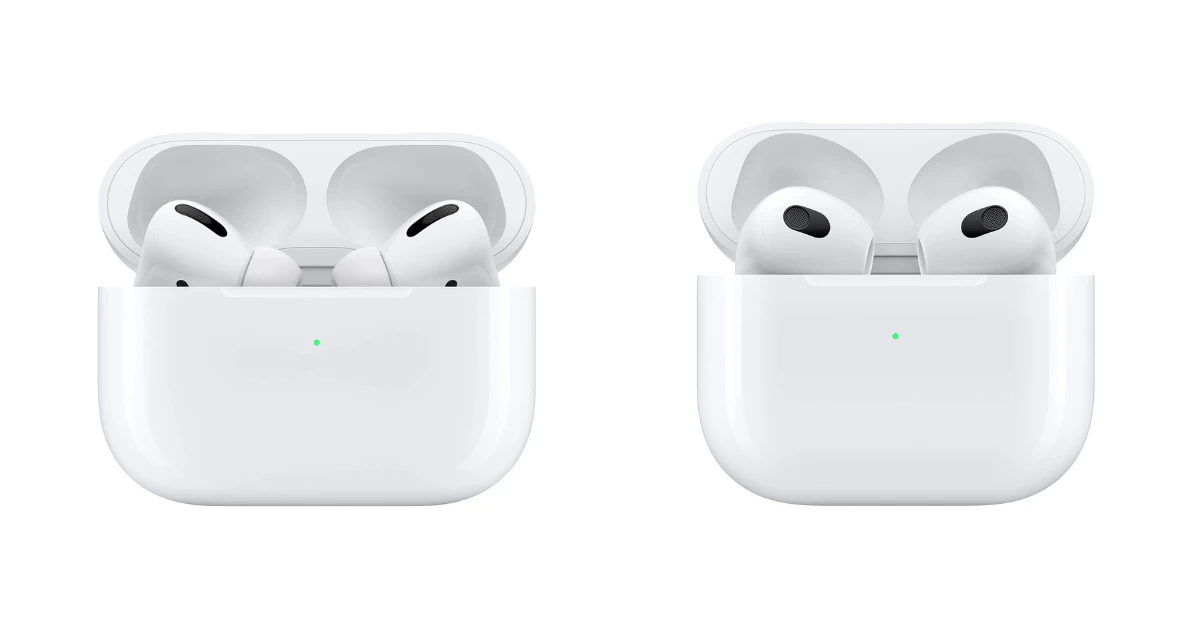
Airpods (1st and 2nd Generation):
- Focus: The primary focus should be on cleaning the speaker grilles, microphone ports, and charging contacts. The design is relatively simple, making it easy to clean.
- Tips: Use a toothpick to carefully remove debris from the speaker grilles. Be extra cautious with the charging contacts in the case.
Airpods Pro (1st and 2nd Generation):
- Focus: Clean the speaker grilles, microphone ports, and charging contacts. Also, clean the silicone ear tips (if applicable).
- Tips: Remove the silicone ear tips and clean them separately with soap and water. Allow them to dry completely before reattaching them. Use a soft brush to clean the mesh on the ear tips.
Airpods Max:
- Focus: Clean the earcups, headband, and charging case.
- Tips: Use a damp cloth to wipe the earcups and headband. Be careful not to get any moisture inside the earcups. For the charging case, use the same techniques as for the AirPods and AirPods Pro cases.
- Note: You can remove the ear cushions to clean them.
Preventative Measures for Future Cleaning
Preventing excessive buildup is just as important as cleaning. Here are some tips to keep your earbuds cleaner for longer:
- Wipe Your Ears: Before inserting your earbuds, wipe your ears with a clean cloth to remove excess earwax and moisture.
- Use Earwax Guards (AirPods Pro): If you have AirPods Pro, consider using earwax guards. These small filters help prevent earwax from entering the speaker grilles.
- Store Properly: When not in use, store your earbuds in their charging case to protect them from dust and debris.
- Avoid Sharing: Sharing earbuds can spread bacteria and earwax.
- Clean Regularly: Make cleaning a routine. Aim to clean your earbuds at least once a week, or more frequently if you use them heavily or exercise regularly.
- Use Protective Covers (Charging Case): Consider using a protective case for your charging case to prevent scratches and dirt accumulation.
By following these preventative measures, you can minimize the amount of cleaning required and extend the life of your Apple earbuds.
Troubleshooting Common Cleaning Issues
Even with careful cleaning, you might encounter some challenges. Here’s how to troubleshoot common issues:
Muffled Sound After Cleaning
If your earbuds sound muffled after cleaning, it could be due to:
- Moisture: Ensure the earbuds are completely dry before use. If they’re still muffled, allow them to air dry for a longer period.
- Debris Inside the Grilles: Double-check the speaker grilles for any remaining debris. Use a toothpick or soft brush to gently remove any obstructions.
- Earwax Buildup in Your Ears: Sometimes, the issue isn’t the earbuds but your ears. Consider cleaning your ears gently with a cotton swab (but don’t push it too far in).
Charging Issues After Cleaning
If your earbuds aren’t charging properly after cleaning, consider:
- Dirty Charging Contacts: Ensure the charging contacts in the case and on the earbuds are clean and making good contact. Use a cotton swab or toothpick to remove any debris.
- Moisture: Make sure the charging contacts are completely dry.
- Case Issues: If the charging case isn’t charging, check the charging port on the case for any debris.
Earbud Damage During Cleaning
If you accidentally damage your earbuds during cleaning:
- Stop Immediately: If you feel any resistance or if you’re unsure about a step, stop and reassess the situation.
- Contact Apple Support: If you’ve caused any damage, contact Apple Support for assistance. They may be able to repair or replace the damaged components.
Remember, patience and gentle handling are key to successful cleaning.
Advanced Cleaning Techniques and Considerations
For more experienced users or those dealing with stubborn debris, here are some advanced cleaning techniques:
Using a Vacuum Cleaner (low Suction)
Caution: This method should be used with extreme caution and only as a last resort. Using a vacuum cleaner can potentially damage the internal components of the earbuds if the suction is too strong.
- Set the Vacuum to Low Suction: Use the lowest possible suction setting on your vacuum cleaner.
- Use a Brush Attachment: Attach a soft brush attachment to the vacuum cleaner nozzle.
- Gently Vacuum the Speaker Grilles: Hold the vacuum cleaner nozzle a short distance away from the speaker grilles and gently vacuum to remove any loose debris. Do not press the nozzle directly against the earbuds.
- Vacuum the Charging Case: You can also use the vacuum cleaner to remove loose debris from the charging case.
Important: If you’re not comfortable with this method, it’s best to stick to the standard cleaning techniques.
Ultrasonic Cleaning
Caution: Ultrasonic cleaning is generally not recommended for Apple earbuds, as it can potentially damage the internal components. However, some users have reported success with this method.
- Use a Dedicated Ultrasonic Cleaner: Use a small ultrasonic cleaner designed for electronics.
- Use a Mild Cleaning Solution: Fill the cleaner with a mild cleaning solution, such as diluted isopropyl alcohol or a specialized electronics cleaning solution.
- Place the Earbuds in the Cleaner: Carefully place the earbuds in the cleaning solution.
- Run the Cleaner for a Short Time: Run the cleaner for a short period (e.g., 1-2 minutes).
- Rinse and Dry Thoroughly: Rinse the earbuds with clean water and allow them to dry completely before use.
Important: The risk of damage is higher with ultrasonic cleaning. Only use this method if you’re experienced and comfortable with it.
Professional Cleaning Services
If you’re uncomfortable cleaning your earbuds yourself or if you’ve tried all other methods without success, consider seeking professional cleaning services. Some electronics repair shops offer specialized cleaning services for earbuds. They may have the tools and expertise to clean your earbuds safely and effectively.
Verdict
Cleaning your Apple earbuds is a crucial part of maintaining their performance, hygiene, and longevity. By following the step-by-step guide provided, you can effectively remove dirt, earwax, and debris, ensuring clear audio and preventing potential ear infections. Remember to use the right tools, be gentle, and take preventative measures to minimize future buildup. Regular cleaning is a small investment that will keep your earbuds sounding and feeling their best for years to come.
Proper care not only enhances your listening experience but also protects your investment. With consistent cleaning and maintenance, your Apple earbuds will continue to provide you with high-quality audio and reliable performance, allowing you to enjoy your favorite music, podcasts, and calls without interruption. Make cleaning a regular part of your routine, and you’ll be rewarded with a superior audio experience and peace of mind.
Recommended Products