How to Charge Groovz Earbuds: A Comprehensive Guide
So, you’ve got your hands on a pair of Groovz earbuds, awesome! Whether you’re a music enthusiast, a podcast aficionado, or just someone who enjoys a good audiobook, these little audio companions are designed to deliver sound wherever you go. But like any tech device, they need power. Knowing how to charge your Groovz earbuds properly is crucial to keeping the tunes flowing. This guide will take you through every step, ensuring you get the most out of your listening experience.
We’ll cover everything from the basics of charging to troubleshooting common issues and maximizing your battery life. We’ll also look at the different charging methods and what to expect in terms of charging times. Consider this your complete resource to keep your Groovz earbuds ready for action. Let’s get started!
Understanding Your Groovz Earbuds and Their Components
Before we jump into charging, let’s get acquainted with the components involved. Understanding these will help you troubleshoot any charging problems that might arise.
The Earbuds
The earbuds themselves are the stars of the show. They contain the speakers, the battery, and the Bluetooth receiver. They’re designed to be compact and lightweight, making them easy to carry around. They also house the charging contacts, which are usually small metallic points that connect with the charging case. These contacts are crucial for transferring power.
The Charging Case
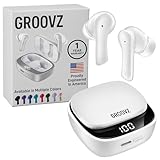
The charging case is more than just a storage container; it’s a portable power bank for your earbuds. Inside, there’s a built-in battery that can recharge your earbuds multiple times before needing to be recharged itself. The case also protects the earbuds from dust, moisture, and impact. The case typically has an LED indicator that shows the charging status and battery level of both the case and the earbuds.
The Charging Cable
Most Groovz earbuds come with a USB charging cable. This cable is used to connect the charging case to a power source. The type of USB connector (USB-C or Micro-USB) will vary depending on the model. Ensure you have the correct cable for your specific Groovz earbuds to avoid any charging issues.
Power Source
You’ll need a power source to charge the charging case. This can be a USB wall adapter (like the one that comes with your phone), a computer’s USB port, a power bank, or even a car charger with a USB port. The power source provides the electricity that the charging case uses to replenish its battery and, in turn, charge your earbuds.
Step-by-Step Guide: How to Charge Your Groovz Earbuds
Now, let’s get down to the nitty-gritty of charging your Groovz earbuds. Following these steps will ensure a smooth and efficient charging process.
Step 1: Identify Your Charging Port and Cable
First, locate the charging port on your Groovz charging case. This is usually a USB-C or Micro-USB port. Check the cable that came with your earbuds. Ensure that the cable’s connector matches the charging port on your case. Using the wrong cable will prevent your case from charging.
Step 2: Connect the Charging Case to a Power Source
Plug the USB end of the charging cable into a power source, such as a USB wall adapter or a computer’s USB port. Then, connect the other end (USB-C or Micro-USB) to the charging port on your case. Make sure the connection is secure. You should feel a slight click when the cable is properly inserted.
Step 3: Place the Earbuds in the Charging Case
Open the charging case and carefully place your Groovz earbuds into their designated slots. The earbuds should fit snugly into the case, and the charging contacts on the earbuds should align with the charging pins in the case. Ensure that each earbud is correctly positioned. Some cases have magnets that help guide the earbuds into place.
Step 4: Check the LED Indicators
Once the earbuds are placed in the case and the case is connected to a power source, check the LED indicators on the case. These lights provide crucial information about the charging status:
- Solid Light: Indicates that the case is charging.
- Flashing Light: Often means the case is charging, or sometimes that there is an issue.
- Solid Green Light: Usually means the case is fully charged.
- Earbud Indicators: Some cases have separate LED indicators for each earbud, showing their individual charging status.
Refer to your Groovz earbuds’ manual for specific LED indicator meanings, as these can vary slightly between models.
Step 5: Allow Sufficient Charging Time
The charging time for your Groovz earbuds will depend on the model and the power source. Generally, it takes around 1 to 2 hours to fully charge the earbuds and the charging case. While charging, the LED indicators will provide updates on the progress. It’s safe to leave the earbuds charging overnight.
Step 6: Disconnect and Enjoy
Once the charging case and earbuds are fully charged (indicated by the LED lights), disconnect the charging cable. Remove the earbuds from the case, and they are ready to use. Enjoy your music, podcasts, or calls!
Different Charging Methods and Their Pros and Cons
There are several ways to charge your Groovz earbuds, each with its own advantages and disadvantages. Choosing the right method can optimize charging speed and convenience.
Using a USB Wall Adapter
Pros:
- Fast Charging: Wall adapters typically deliver a higher power output, resulting in faster charging times.
- Convenience: Easy to use at home or in the office.
- Safety: Modern wall adapters have built-in safety features to prevent overcharging and overheating.
Cons:
- Requires an outlet: You need access to a power outlet, which limits portability.
- Can be bulky: Wall adapters can take up space in your bag.
Using a Computer’s USB Port
Pros:
- Portability: You can charge your earbuds anywhere you have access to a computer.
- No extra adapter needed: You don’t need to carry a separate wall adapter.
Cons:
- Slower Charging: USB ports on computers typically provide less power than wall adapters, leading to slower charging.
- Dependent on the computer: You need to have your computer turned on.
Using a Power Bank
Pros:
- Extreme Portability: Ideal for charging on the go.
- Convenience: No need for a wall outlet.
- Multiple Charges: Power banks can charge your earbuds multiple times.
Cons:
- Requires a charged power bank: You need to remember to charge your power bank.
- Charging Speed: The charging speed depends on the power bank’s output.
Using a Car Charger
Pros:
- Convenience on the road: Charges your earbuds while you drive.
- No need for a wall outlet: Perfect for long trips.
Cons:
- Requires a car: Only useful if you have access to a car.
- Charging Speed: Depends on the car charger’s output.
Troubleshooting Common Charging Issues
Sometimes, you might encounter issues when charging your Groovz earbuds. Here’s how to troubleshoot some common problems:
Earbuds Not Charging
Possible Causes:
- Incorrect Placement: Make sure the earbuds are correctly placed in the charging case, ensuring the charging contacts align.
- Dirty Contacts: Dust or debris on the charging contacts can prevent a proper connection.
- Faulty Cable: The charging cable might be damaged or not working.
- Dead Charging Case: The charging case’s battery might be depleted.
- Faulty Earbuds: There might be an internal issue with the earbuds.
Solutions:
- Reposition the Earbuds: Open and close the charging case, ensuring the earbuds are seated properly.
- Clean the Contacts: Use a cotton swab or a soft, dry cloth to clean the charging contacts on both the earbuds and the case.
- Try a Different Cable: Use a different USB cable to see if the original cable is faulty.
- Charge the Case: Ensure the charging case is charged by connecting it to a power source.
- Contact Support: If the issue persists, the earbuds might have an internal problem and need servicing.
Charging Case Not Charging
Possible Causes:
- Faulty Cable: The charging cable might be damaged.
- Faulty Adapter: The wall adapter or power source might not be working.
- Dirty Charging Port: Debris might be blocking the charging port on the case.
- Internal Issues: The charging case might have an internal problem.
Solutions:
- Try a Different Cable: Use a different USB cable to see if the original cable is faulty.
- Try a Different Power Source: Try a different wall adapter, computer USB port, or power bank.
- Clean the Charging Port: Use a toothpick or a small brush to gently clean the charging port.
- Contact Support: If the issue continues, there might be an internal problem with the charging case.
Charging Case Drains Quickly
Possible Causes:
- Old Battery: The battery in the charging case might be old and losing its ability to hold a charge.
- Overuse: Using the earbuds and charging case excessively can reduce battery life over time.
- Extreme Temperatures: Exposing the charging case to extreme temperatures can affect battery performance.
Solutions:
- Consider Replacing: If the charging case is old, consider replacing it.
- Reduce Usage: Try to limit how frequently you use the earbuds and recharge the case.
- Avoid Extreme Temperatures: Store the charging case in a moderate temperature environment.
Slow Charging
Possible Causes:
- Low Power Source: Using a low-power USB port (e.g., from an older computer).
- Faulty Cable: The charging cable might be faulty.
- Dirty Contacts: Dirty charging contacts can impede the flow of electricity.
Solutions:
- Use a Higher Power Source: Use a wall adapter or a USB port that provides more power.
- Try a Different Cable: Use a different USB cable to see if the original cable is faulty.
- Clean the Contacts: Clean the charging contacts on both the earbuds and the case.
Maximizing Your Groovz Earbuds’ Battery Life
Extending the lifespan of your Groovz earbuds’ battery involves a few key practices that can ensure you get the most out of each charge.
Proper Charging Habits
Avoid Overcharging: While it’s generally safe to leave your earbuds charging overnight, try not to leave them connected to a power source for extended periods once they are fully charged. Overcharging can potentially degrade the battery over time.
Charge Regularly: Don’t let your earbuds completely drain before charging them. Charging them when the battery is at around 20% or 30% can help maintain battery health.
Optimizing Usage
Volume Levels: Using lower volume levels conserves battery. The louder the volume, the more power the earbuds consume.
Bluetooth Connection: When not in use, turn off the Bluetooth connection on your device to prevent unnecessary battery drain. Some earbuds will continue to search for a connection even when not in use, which drains the battery.
Earbud Usage: If you only need to use one earbud, consider using only one to conserve battery. Many earbuds support single-earbud mode.
Storage and Environment
Temperature Control: Avoid storing your earbuds in extreme temperatures. Heat and cold can negatively affect battery performance.
Cleanliness: Keep the charging contacts clean. Dust and debris can interfere with charging and reduce battery efficiency.
Comparing Groovz Earbud Charging Times and Battery Life
Groovz earbuds come in various models, each with slightly different charging times and battery life. It is important to know the specifications of your specific model. Here’s a general comparison table to give you an idea:
| Feature | Typical Range |
|---|---|
| Earbud Charging Time | 1-2 hours |
| Charging Case Charging Time | 1-2 hours |
| Earbud Playtime (per charge) | 3-8 hours (varies by model and volume) |
| Charging Case Recharge Cycles | 2-4 times (varies by model) |
| Total Playtime (with case) | 10-32 hours (varies by model) |
Note: These are general estimates. Actual charging times and battery life can vary depending on usage, volume levels, and environmental conditions. Always refer to your Groovz earbuds’ manual for the most accurate specifications for your model.
Tips for Safe Charging
Safety should always be a priority when charging any electronic device. Here are some tips to ensure your Groovz earbuds charge safely:
Use Certified Cables and Adapters: Always use the charging cable that came with your Groovz earbuds or a certified replacement. Using an uncertified cable can potentially damage your device or pose a safety risk.
Avoid Extreme Temperatures: Do not charge your earbuds in extreme temperatures. This can damage the battery and potentially lead to safety hazards.
Inspect for Damage: Before charging, inspect the charging cable and the earbuds for any signs of damage, such as frayed wires or cracks. If you see any damage, do not use the cable or earbuds.
Unplug When Finished: Once the earbuds and charging case are fully charged, unplug the charging cable. Leaving them connected to a power source for an extended period is unnecessary and can potentially shorten the battery’s lifespan.
Supervise Children: If children are using the earbuds or charging the case, ensure they are supervised to prevent any misuse or accidents.
Do Not Attempt to Disassemble: Never attempt to disassemble the charging case or the earbuds. This can be dangerous and will void your warranty.
Final Verdict
Charging your Groovz earbuds is a straightforward process, but understanding the details ensures optimal performance and longevity. From identifying the correct charging cable to troubleshooting common issues, this guide has equipped you with the knowledge to keep your earbuds ready to go. By following the recommended charging practices and being mindful of your usage habits, you can maximize your listening time and enjoy your Groovz earbuds for years to come.
Remember to always prioritize safety and consult your user manual for specific information related to your Groovz model. Enjoy your music!
Recommended Products