How to Turn on Jlab Go Sport Earbuds: A Simple Guide
Hey there! If you’ve just grabbed a pair of JLab GO Sport earbuds, welcome to a world of wire-free audio bliss. These earbuds are designed for your active lifestyle, whether you’re hitting the gym, going for a run, or just chilling at home. But before you can enjoy your tunes, you’ll need to know how to turn them on. Don’t worry, it’s super easy, and this guide will walk you through every step.
We’ll cover the basics, from the initial setup to troubleshooting common issues. I’ll break down the process in a way that’s clear and concise, so you can start listening to your favorite music, podcasts, or audiobooks in no time. We’ll also explore some helpful tips and tricks to get the most out of your new earbuds. Let’s get started and get those JLab GO Sport earbuds pumping out the sound!
Understanding Your Jlab Go Sport Earbuds
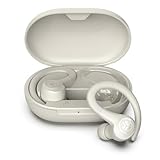
Before we jump into turning on your earbuds, let’s get acquainted with the basics. The JLab GO Sport earbuds are designed for active use, meaning they’re built to withstand sweat and movement. They typically come with a charging case, which is crucial for both storing and charging the earbuds. The earbuds themselves have a sleek design and come with different-sized ear tips to ensure a comfortable and secure fit. Understanding these elements will help you use the earbuds effectively.
Key Components and Features
- Earbuds: These are the primary audio devices. They contain the drivers, battery, and controls.
- Charging Case: This case protects the earbuds and provides additional battery life.
- Ear Tips: Usually come in multiple sizes (S, M, L) to fit different ear shapes and sizes.
- USB Charging Cable: Used to charge the charging case.
- Touch Controls: Most models use touch-sensitive surfaces on the earbuds for controlling playback, volume, and calls.
Knowing these parts will help you understand the instructions and troubleshoot any issues that might arise.
How to Turn on Your Jlab Go Sport Earbuds: Step-by-Step Guide
Turning on your JLab GO Sport earbuds is a straightforward process. Here’s a detailed guide to get you up and running:
Step 1: Charging the Earbuds and Case
Ensure the charging case and earbuds are adequately charged before your initial use. Out of the box, they might have some charge, but it’s best to start with a full charge. This ensures you can use the earbuds right away without interruption.
- Charge the Case: Use the provided USB charging cable to connect the charging case to a power source (like a USB wall adapter or a computer). The case will have an indicator light that shows the charging status. Often, this is a flashing or solid light.
- Charge the Earbuds: Place the earbuds inside the charging case. They should automatically start charging when properly seated. The earbuds may have their own indicator lights, which often illuminate when charging.
- Wait for Full Charge: Allow the case and earbuds to charge fully. This usually takes a couple of hours. A full charge will provide the maximum playtime.
Why this matters: A full charge is essential for a good first experience. It prevents frustration from dead batteries and ensures the earbuds are ready for use.
Step 2: Turning on the Earbuds
There are typically two ways to turn on your JLab GO Sport earbuds:
- Automatic Power On: Most JLab GO Sport earbuds will automatically turn on when you remove them from the charging case. The earbuds will power on and try to connect to a paired device.
- Manual Power On (if applicable): Some models may have a touch-sensitive area on each earbud. To turn them on manually, you might need to tap or press and hold this area for a few seconds. The exact method will be detailed in your user manual.
Important Note: Refer to the specific instructions in your JLab GO Sport earbuds’ user manual. The exact method can vary slightly between models.
Why this matters: Knowing both methods ensures you can always get your earbuds working, even if one method fails.
Step 3: Pairing with Your Device
Once the earbuds are on, they need to be paired with your smartphone, tablet, or other Bluetooth-enabled device. Here’s how to do it:
- Enable Bluetooth: On your device (phone, tablet, etc.), go to the Bluetooth settings and ensure Bluetooth is turned on.
- Put Earbuds in Pairing Mode: When you remove them from the case, or after turning them on manually, your earbuds should automatically enter pairing mode. The indicator lights on the earbuds or case will typically flash to indicate pairing mode.
- Select Your Earbuds: Your device should scan for available Bluetooth devices. Look for your JLab GO Sport earbuds in the list of available devices (e.g., “JLab GO Sport”). Select them to initiate pairing.
- Confirm Pairing: Your device may ask you to confirm the pairing. If prompted, follow the on-screen instructions. Some devices may require a PIN (usually “0000” or “1234”), but most modern devices will pair automatically.
- Connection Confirmation: Once paired, your device will display a confirmation message, and the earbuds will be connected. The indicator lights on the earbuds will likely change to indicate a successful connection (e.g., solid blue or green).
Why this matters: Pairing allows your earbuds to receive audio from your device. Without pairing, you won’t hear anything.
Step 4: Using the Touch Controls
Most JLab GO Sport earbuds use touch controls. Here’s a quick guide to common controls:
- Play/Pause: Usually, a single tap on either earbud.
- Next Track: Double-tap the right earbud.
- Previous Track: Double-tap the left earbud.
- Volume Up: Tap and hold the right earbud.
- Volume Down: Tap and hold the left earbud.
- Answer/End Calls: Single tap on either earbud.
- Reject Incoming Call: Tap and hold on either earbud for a few seconds.
- Activate Voice Assistant (Siri, Google Assistant): Triple-tap either earbud.
Note: These controls are typical but might vary slightly depending on your specific JLab GO Sport model. Refer to your user manual for the exact controls.
Why this matters: Knowing the controls allows you to manage your audio and calls without reaching for your device.
Troubleshooting Common Issues
Sometimes, things don’t go perfectly. Here are some common problems and their solutions:
Problem 1: Earbuds Won’t Turn On
- Solution:
- Check Battery: Make sure the earbuds and charging case are charged. Place the earbuds back in the case and ensure they are charging.
- Manual Power On: If automatic power-on isn’t working, try the manual power-on method (tap and hold the touch control).
- Reset: Refer to the user manual for instructions on how to reset the earbuds. This often involves placing the earbuds in the case and pressing a button or using a specific touch sequence.
Why this matters: If your earbuds won’t turn on, you can’t use them. These steps help you quickly diagnose and fix the issue.
Problem 2: Earbuds Won’t Pair
- Solution:
- Bluetooth Enabled: Ensure Bluetooth is enabled on your device.
- Pairing Mode: Make sure the earbuds are in pairing mode (indicator lights flashing).
- Forget and Re-pair: On your device, “forget” the earbuds in the Bluetooth settings, then try pairing again.
- Restart Devices: Restart both your device and the earbuds.
- Check for Interference: Move away from other Bluetooth devices that might cause interference.
Why this matters: Pairing is essential for using the earbuds. These steps help resolve pairing problems quickly.
Problem 3: One Earbud Not Working
- Solution:
- Re-seat the Earbud: Make sure the earbud is properly seated in the charging case.
- Check Charge: Ensure both earbuds have sufficient charge.
- Reset Earbuds: Reset the earbuds (refer to your user manual).
- Check Balance in Device Settings: Ensure the audio balance isn’t skewed toward one earbud in your device’s audio settings.
Why this matters: Having only one earbud working ruins the stereo experience. These steps help get both earbuds functioning.
Problem 4: Poor Sound Quality
- Solution:
- Check Ear Tips: Ensure you are using the correct size ear tips for a good seal. A good seal enhances bass and overall sound quality.
- Clean Earbuds: Clean the earbud nozzles and ear tips of any wax or debris.
- Adjust Volume: Adjust the volume on both the earbuds and your device.
- Equalizer Settings: Experiment with the equalizer settings on your device or in the music app to adjust the sound.
- Check for Interference: Make sure there are no sources of interference (other Bluetooth devices, Wi-Fi routers, etc.).
Why this matters: Good sound quality is the primary purpose of using earbuds. These steps help you optimize your listening experience.
Problem 5: Earbuds Disconnecting
- Solution:
- Check Distance: Stay within the recommended Bluetooth range (usually around 33 feet or 10 meters). Walls and other obstructions can reduce the range.
- Check for Interference: Move away from other Bluetooth devices or Wi-Fi routers that might cause interference.
- Restart Devices: Restart both your device and the earbuds.
- Forget and Re-pair: On your device, “forget” the earbuds in the Bluetooth settings, then try pairing again.
- Update Firmware: Check if there are any firmware updates available for your earbuds. You can usually find this information on the JLab website or through the JLab app.
Why this matters: Frequent disconnections are frustrating. These steps help maintain a stable connection.
Tips and Tricks for Optimizing Your Jlab Go Sport Earbud Experience
Now that you know how to turn on and troubleshoot your earbuds, here are some tips to enhance your experience:
Tip 1: Choosing the Right Ear Tips
Finding the right ear tips is crucial for comfort and sound quality. JLab GO Sport earbuds usually come with multiple sizes. Experiment with different sizes to find the best fit. A good fit will:
- Provide a Secure Seal: This helps with noise isolation and enhances bass response.
- Be Comfortable: The earbuds shouldn’t cause discomfort, even during extended use.
- Stay in Place: The earbuds should remain secure during movement, especially during workouts.
How to test: Insert the earbuds with different tips and gently tug on them. If they feel loose, try a larger size. If they feel too tight or cause discomfort, try a smaller size.
Why this matters: The right fit dramatically improves your listening experience and ensures the earbuds stay in place during physical activity.
Tip 2: Cleaning and Maintenance
Regular cleaning will keep your earbuds working their best and extend their lifespan.
- Clean Ear Tips: Remove the ear tips and wash them with mild soap and water. Dry them thoroughly before reattaching them.
- Clean Earbud Nozzles: Use a soft, dry brush or cotton swab to gently remove any wax or debris from the earbud nozzles. Avoid using sharp objects, which can damage the internal components.
- Clean Charging Case: Wipe the charging case with a soft, dry cloth. Avoid getting moisture inside the case.
- Storage: When not in use, store your earbuds in the charging case to protect them and conserve battery life.
Why this matters: Regular cleaning prevents the buildup of earwax and other debris, which can affect sound quality and potentially damage the earbuds.
Tip 3: Maximizing Battery Life
Extend your battery life by following these tips:
- Charge Fully: Always fully charge the earbuds and charging case before use.
- Store in Case: When not in use, store the earbuds in the charging case. This also charges them.
- Turn Off When Not Using: If you won’t be using the earbuds for an extended period, turn them off manually or place them in the charging case to conserve battery.
- Control Volume: Lowering the volume can help extend battery life.
- Use the Charging Case: The charging case provides multiple extra charges for your earbuds on the go.
Why this matters: Maximizing battery life ensures you can enjoy your music for longer periods.
Tip 4: Using the Jlab App (if Available)
Check if JLab offers a companion app for your earbuds. The app can provide additional features and customization options.
- Equalizer Settings: Adjust the sound profile to your preferences.
- Custom Controls: Customize the touch controls.
- Firmware Updates: Receive firmware updates for performance improvements.
- User Manual: Access the user manual.
How to find the app: Search for “JLab” in your device’s app store (Google Play Store for Android or App Store for iOS).
Why this matters: The app can greatly enhance your user experience by offering advanced features and personalization options.
Tip 5: Resetting Your Earbuds
If you encounter persistent issues, a reset can often resolve them. The reset process varies depending on the model, so refer to your user manual.
Common reset steps:
- Place both earbuds in the charging case.
- Press and hold a button on the case or perform a specific touch sequence on the earbuds (refer to the manual).
- Wait for the indicator lights to change, indicating the reset is complete.
- Remove the earbuds from the case and try pairing them again.
Why this matters: Resetting the earbuds can resolve various software-related issues and restore them to their factory settings.
Tip 6: Warranty and Support
Know your warranty and how to get support. JLab usually offers a warranty on their products. If you encounter any problems, reach out to their customer support.
- Check Warranty Information: Review the warranty documentation that came with your earbuds or visit the JLab website.
- Contact Support: If you have any issues, contact JLab’s customer support through their website or by phone.
- Provide Details: When contacting support, provide as much detail as possible about the issue you are experiencing.
Why this matters: Knowing the warranty and having access to support provides peace of mind and ensures you can get assistance if you need it.
Conclusion
Turning on your JLab GO Sport earbuds is a simple process, but understanding the steps involved and knowing how to troubleshoot common problems can significantly enhance your experience. By following this guide, you can quickly start enjoying your favorite music and other audio content. Remember to charge your earbuds and case fully, pair them with your device, and familiarize yourself with the touch controls.
Don’t hesitate to consult the user manual for specific details about your model. With a bit of practice and these tips, you’ll be well on your way to enjoying your JLab GO Sport earbuds to the fullest. Enjoy your music!
Recommended Products